
示例:使用 EVPN 配置 VXLAN 数据中心互连
此示例说明如何使用以太网 VPN (EVPN) 配置虚拟可扩展局域网 (VXLAN) 数据中心连接,以利用 EVPN 作为数据中心互连 (DCI) 解决方案的优势。
要求
此示例使用以下硬件和软件组件:
位于不同数据中心 (DC) 中的两个提供商边缘 (PE) 设备充当 VXLAN 隧道端点 (VTEP)。
两台客户边缘 (CE) 设备。
四个主机设备连接到每个 PE 和 CE 设备。
开始之前:
配置设备接口。
在所有设备上配置 IGP,例如 OSPF。
在 PE 设备之间建立 BGP 会话。
在 PE 设备上配置 MPLS 和 RSVP。
在 CE 设备和 PE 设备的路由实例中配置 PIM。
概述
VXLAN 是一种使用隧道方案提供数据中心内连接的技术,可在中间的第 3 层网络上扩展第 2 层连接。
另一方面,以太网 VPN (EVPN) 技术使用基于 MPLS/IP 网络的 BGP 控制平面,为多点第 2 层 VPN 服务提供解决方案,具有高级多宿主功能。
尽管数据中心连接有多种解决方案可用,但与现有 MPLS 数据中心互连 (DCI) 技术相比,EVPN 与 VXLAN 的集成提供了额外的优势。
EVPN 通过添加扩展控制平面程序,在参与的数据中心边界路由器 (DCBR) 之间交换第 2 层 MAC 地址和第 3 层 IP 地址信息,为新一代 DCI 提供了机制。EVPN 具有主动-主动冗余、混叠和批量 MAC 撤销等高级功能,有助于解决 DCI 挑战,例如无缝虚拟机移动性和最佳 IP 路由,因此通过 EVPN 提供 VXLAN 解决方案变得至关重要。
图 1 显示了位于不同数据中心(分别为 DC1 和 DC2)的设备 PE1 和 PE2 之间使用 EVPN 进行 VXLAN 数据中心互连。每个 PE 设备连接到一个 CE 设备和一个主机。所有 PE 和 CE 设备均配置在 VLAN 10 下,并使用相同的 VXLAN 网络标识符 (VNI) 10。设备 CE1 和 PE1 属于 192.168.1.10 的组播组,设备 CE2 和 PE2 属于 172.16.1.10 的组播组。
拓扑学
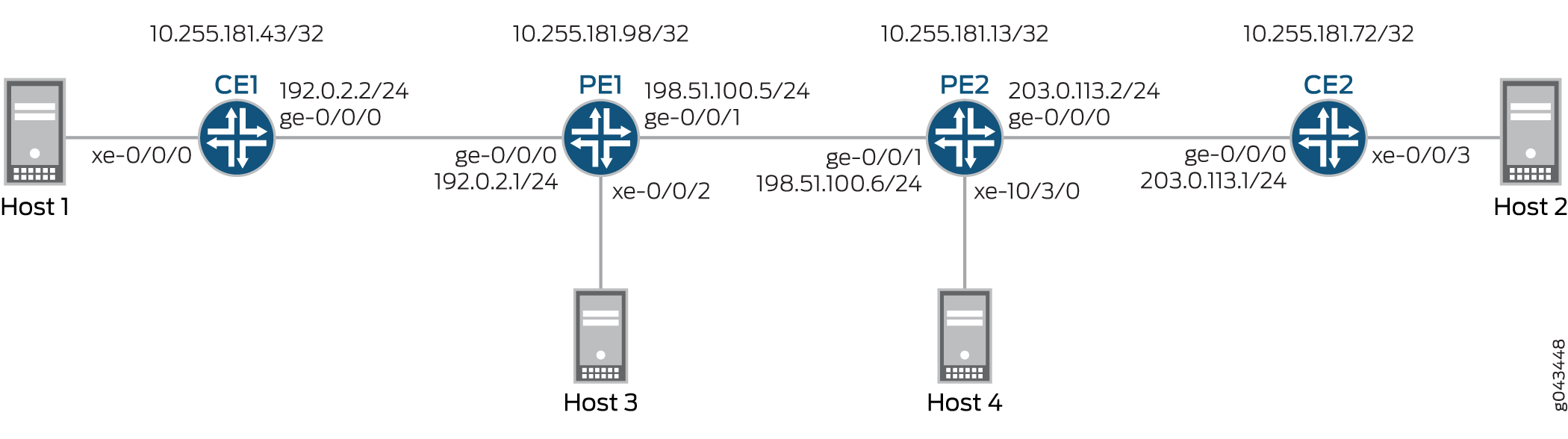 的 VXLAN 数据中心互连
配置
CLI 快速配置
要快速配置此示例,请复制以下命令,将其粘贴到文本文件中,删除所有换行符,更改详细信息,以便与网络配置匹配,将命令复制并粘贴到 [edit] 层次结构级别的 CLI 中,然后从配置模式进入 commit。
CE1
set interfaces xe-0/0/0 vlan-tagging
set interfaces xe-0/0/0 encapsulation flexible-ethernet-services
set interfaces xe-0/0/0 unit 10 encapsulation vlan-bridge
set interfaces xe-0/0/0 unit 10 vlan-id 10
set interfaces ge-0/0/0 unit 0 family inet address 192.0.2.2/24
set interfaces ge-0/0/0 unit 0 family mpls
set interfaces lo0 unit 0 family inet address 10.255.181.43/32
set protocols ospf area 0.0.0.0 interface ge-0/0/0.0
set protocols ospf area 0.0.0.0 interface lo0.0 passive
set protocols ospf area 0.0.0.0 interface fxp0.0 disable
set protocols pim rp local address 10.255.181.43
set protocols pim interface all
set bridge-domains evpn10 vlan-id 10
set bridge-domains evpn10 interface xe-0/0/0.10
set bridge-domains vxlan vni 10
set bridge-domains vxlan multicast-group 172.16.1.10
set bridge-domains vxlan encapsulate-inner-vlan
set bridge-domains vxlan decapsulate-accept-inner-vlan
CE2 认证
set interfaces xe-0/0/3 vlan-tagging
set interfaces xe-0/0/3 encapsulation flexible-ethernet-services
set interfaces xe-0/0/3 unit 10 encapsulation vlan-bridge
set interfaces xe-0/0/3 unit 10 vlan-id 10
set interfaces lo0 unit 0 family inet address 10.255.181.72/32
set protocols ospf area 0 interface ge-0/0/0.0
set protocols ospf area 0 interface lo0.0 passive
set protocols ospf area 0 interface fxp0.0 disable
set protocols pim rp local address 10.255.181.72
set protocols pim interface all
set bridge-domains evpn10 vlan-id 10
set bridge-domains evpn10 interface xe-0/0/3.10
set bridge-domains vxlan vni 10
set bridge-domains vxlan multicast-group 192.168.1.10
set bridge-domains vxlan encapsulate-inner-vlan
set bridge-domains vxlan decapsulate-accept-inner-vlan
PE1型
set interfaces xe-0/0/2 vlan-tagging
set interfaces xe-0/0/2 encapsulation flexible-ethernet-services
set interfaces xe-0/0/2 unit 10 encapsulation vlan-bridge
set interfaces xe-0/0/2 unit 10 vlan-id 10
set interfaces ge-0/0/0 unit 0 family inet address 192.0.2.1/24
set interfaces ge-0/0/1 mtu 1600
set interfaces ge-0/0/1 unit 0 family inet address 198.51.100.5/24
set interfaces ge-0/0/1 unit 0 family mpls
set interfaces lo0 unit 1 family inet address 10.255.181.98/32
set protocols rsvp interface all
set protocols mpls no-cspf
set protocols mpls label-switched-path to-PE2 to 10.255.181.13
set protocols mpls interface all
set protocols bgp family evpn signaling
set protocols bgp group ibgp type internal
set protocols bgp group ibgp neighbor 10.255.181.13 local-address 10.255.181.98
set protocols ospf area 0 interface ge-0/0/1.0
set protocols ospf area 0 interface fxp0.0 disable
set protocols ospf area 0 interface lo0.0 passive
set routing-instances evpn10 vtep-source-interface lo0.0
set routing-instances evpn10 instance-type evpn
set routing-instances evpn10 vlan-id 10
set routing-instances evpn10 interface xe-0/0/2.10
set routing-instances evpn10 vxlan vni 10
set routing-instances evpn10 vxlan multicast-group 172.16.1.10
set routing-instances evpn10 vxlan encapsulate-inner-vlan
set routing-instances evpn10 vxlan decapsulate-accept-inner-vlan
set routing-instances evpn10 route-distinguisher 10.255.181.98:10
set routing-instances evpn10 vrf-target target:10:10
set routing-instances evpn10 protocols evpn
set routing-instances evpna instance-type vrf
set routing-instances evpna route-distinguisher 10.255.181.98:11
set routing-instances evpna vrf-target target:65000:11
set routing-instances evpna vrf-table-label
set routing-instances vrf instance-type vrf
set routing-instances vrf interface ge-0/0/0.0
set routing-instances vrf interface lo0.0
set routing-instances vrf route-distinguisher 10.255.181.98:100
set routing-instances vrf vrf-target target:100:100
set routing-instances vrf protocols ospf area 0 interface lo0.0 passive
set routing-instances vrf protocols ospf area 0 interface ge-0/0/0.0
set routing-instances vrf protocols pim rp static address 10.255.181.43
set routing-instances vrf protocols pim interface all
PE2
set interfaces ge-0/0/1 mtu 1600
set interfaces ge-0/0/1 unit 0 family inet address 198.51.100.6/24
set interfaces ge-0/0/1 unit 0 family mpls
set interfaces xe-10/3/0 vlan-tagging
set interfaces xe-10/3/0 encapsulation flexible-ethernet-services
set interfaces xe-10/3/0 unit 10 encapsulation vlan-bridge
set interfaces xe-10/3/0 unit 10 vlan-id 10
set interfaces lo0 unit 1 family inet address 10.255.181.13/32
set protocols rsvp interface all
set protocols mpls no-cspf
set protocols mpls label-switched-path to-PE1 to 10.255.181.98
set protocols mpls interface all
set protocols bgp family evpn signaling
set protocols bgp group ibgp type internal
set protocols bgp group ibgp neighbor 10.255.181.98 local-address 10.255.181.13
set protocols ospf area 0 interface ge-0/0/1.0
set protocols ospf area 0 interface fxp0.0 disable
set protocols ospf area 0 interface lo0.0 passive
set routing-instances evpn10 vtep-source-interface lo0.0
set routing-instances evpn10 instance-type evpn
set routing-instances evpn10 vlan-id 10
set routing-instances evpn10 interface xe-10/3/0.10
set routing-instances evpn10 vxlan vni 10
set routing-instances evpn10 vxlan multicast-group 192.168.1.10
set routing-instances evpn10 vxlan encapsulate-inner-vlan
set routing-instances evpn10 vxlan decapsulate-accept-inner-vlan
set routing-instances evpn10 route-distinguisher 10.255.181.13:10
set routing-instances evpn10 vrf-target target:10:10
set routing-instances evpn10 protocols evpn
set routing-instances evpna instance-type vrf
set routing-instances evpna route-distinguisher 10.255.181.13:11
set routing-instances evpna vrf-target target:65000:11
set routing-instances evpna vrf-table-label
set routing-instances vrf instance-type vrf
set routing-instances vrf interface xe-10/3/0.0
set routing-instances vrf interface lo0.0
set routing-instances vrf route-distinguisher 10.255.181.13:100
set routing-instances vrf vrf-target target:100:100
set routing-instances vrf protocols ospf area 0 interface lo0.0 passive
set routing-instances vrf protocols ospf area 0 interface xe-10/3/0.0
set routing-instances vrf protocols pim rp static address 10.255.181.72
set routing-instances vrf protocols pim interface all
程序
分步过程
下面的示例要求您在各个配置层级中进行导航。有关 CLI 导航的信息,请参阅 在配置模式下使用 CLI 编辑器。
要配置设备 CE1,请执行以下作:
在修改相应的接口名称、地址和其他参数后,对设备 CE2 重复此过程。
配置设备 CE1 接口。
[edit interfaces]
user@CE1# set xe-0/0/0 vlan-tagging
user@CE1# set xe-0/0/0 encapsulation flexible-ethernet-services
user@CE1# set xe-0/0/0 unit 10 encapsulation vlan-bridge
user@CE1# set xe-0/0/0 unit 10 vlan-id 10
user@CE1# set ge-0/0/0 unit 0 family inet address 192.0.2.2/24
user@CE1# set ge-0/0/0 unit 0 family mpls
user@CE1# set lo0 unit 0 family inet address 10.255.181.43/32
在设备CE1接口(不包括管理接口)上启用OSPF。
[edit protocols]
user@CE1# set ospf area 0.0.0.0 interface ge-0/0/0.0
user@CE1# set ospf area 0.0.0.0 interface lo0.0 passive
user@CE1# set ospf area 0.0.0.0 interface fxp0.0 disable
在设备 CE1 的所有接口上启用 PIM。
[edit protocols]
user@CE1# set pim rp local address 10.255.181.43
user@CE1# set pim interface all
配置 EVPN 桥接域,并分配 VLAN ID 和接口。
[edit bridge-domains]
user@CE1# set evpn10 vlan-id 10
user@CE1# set evpn10 interface xe-0/0/0.10
配置 VXLAN 网桥域,分配 VXLAN ID、组播组地址以及封装和解封装参数。
[edit bridge-domains]
user@CE1# set vxlan vni 10
user@CE1# set vxlan multicast-group 172.16.1.10
user@CE1# set vxlan encapsulate-inner-vlan
user@CE1# set vxlan decapsulate-accept-inner-vlan
分步过程
要配置设备 PE1,请执行以下作:
在修改相应的接口名称、地址和其他参数后,对设备 PE2 重复此过程。
配置设备 PE1 接口。
[edit interfaces]
user@PE1# set xe-0/0/2 vlan-tagging
user@PE1# set xe-0/0/2 encapsulation flexible-ethernet-services
user@PE1# set xe-0/0/2 unit 10 encapsulation vlan-bridge
user@PE1# set xe-0/0/2 unit 10 vlan-id 10
user@PE1# set ge-0/0/0 unit 0 family inet address 192.0.2.1/24
user@PE1# set ge-0/0/1 mtu 1600
user@PE1# set ge-0/0/1 unit 0 family inet address 198.51.100.5/24
user@PE1# set ge-0/0/1 unit 0 family mpls
user@PE1# set lo0 unit 1 family inet address 10.255.181.98/32
在设备 PE1 的所有接口上启用 MPLS 和 RSVP。
[edit protocols]
user@PE1# set rsvp interface all
user@PE1# set mpls no-cspf
user@PE1# set mpls interface all
配置从设备 PE1 到设备 PE2 的标签交换路径。
[edit protocols]
user@PE1# set mpls label-switched-path to-PE2 to 10.255.181.13
在设备 PE1 和 PE2 之间配置内部 BGP 对等互连,并为 BGP 会话启用 EVPN 信令。
[edit protocols]
user@PE1# set bgp family evpn signaling
user@PE1# set bgp group ibgp type internal
user@PE1# set bgp group ibgp neighbor 10.255.181.13 local-address 10.255.181.98
在设备 PE1 接口(不包括管理接口)上配置 OSPF。
[edit protocols]
user@PE1# set ospf area 0 interface ge-0/0/1.0
user@PE1# set ospf area 0 interface fxp0.0 disable
user@PE1# set ospf area 0 interface lo0.0 passive
配置 EVPN 路由实例,分配 VXLAN 隧道端点源接口和 VLAN ID,分配路由识别符和 VRF 目标值,并将设备 PE1 接口分配给路由实例。
[edit routing-instances]
user@PE1# set evpn10 vtep-source-interface lo0.0
user@PE1# set evpn10 instance-type evpn
user@PE1# set evpn10 vlan-id 10
user@PE1# set evpn10 interface xe-0/0/2.10
user@PE1# set evpn10 route-distinguisher 10.255.181.13:10
user@PE1# set evpn10 vrf-target target:10:10
user@PE1# set evpn10 protocols evpn
为 EVPN 路由实例分配 VXLAN ID、组播组地址以及封装和解封装参数。
[edit routing-instances]
user@PE1# set evpn10 vxlan vni 10
user@PE1# set evpn10 vxlan multicast-group 172.16.1.10
user@PE1# set evpn10 vxlan encapsulate-inner-vlan
user@PE1# set evpn10 vxlan decapsulate-accept-inner-vlan
配置第一个 VPN 路由和转发 (VRF) 路由实例,并分配路由识别符和 VRF 目标值。
[edit routing-instances]
user@PE1# set evpna instance-type vrf
user@PE1# set evpna route-distinguisher 10.255.181.13:11
user@PE1# set evpna vrf-target target:65000:11
user@PE1# set evpna vrf-table-label
配置第二个 VRF 路由实例,并分配设备 PE1 接口、路由识别符和 VRF 目标值。
[edit routing-instances]
user@PE1# set vrf instance-type vrf
user@PE1# set vrf interface ge-0/0/0.0
user@PE1# set vrf interface lo0.0
user@PE1# set vrf route-distinguisher 10.255.181.13:100
user@PE1# set vrf vrf-target target:100:100
为第二个 VRF 路由实例配置 OSPF 和 PIM 协议。
[edit routing-instances]
user@PE1# set vrf protocols ospf area 0 interface lo0.0 passive
user@PE1# set vrf protocols ospf area 0 interface ge-0/0/0.0
user@PE1# set vrf protocols pim rp static address 10.255.181.43
user@PE1# set vrf protocols pim interface all
结果
在配置模式下,输入show interfacesshow protocols、和show routing-instances命令,以确认您的配置。如果输出未显示预期的配置,请重复此示例中的说明以更正配置。
CE1
user@CE1# show interfaces
xe-0/0/0 {
    vlan-tagging;
    encapsulation flexible-ethernet-services;
    unit 10 {
        encapsulation vlan-bridge;
        vlan-id 10;
    }
}
ge-0/0/0 {
    unit 0 {
        family inet {
            address 192.0.2.2/24;
        }
        family mpls;
    }
}
lo0 {
    unit 0 {
        family inet {
            address 10.255.181.43/32;
        }
    }
}
user@CE1# show protocols
ospf {
    area 0.0.0.0 {
        interface ge-0/0/0.0;
        interface lo0.0 {
            passive;
        }
        interface fxp0.0 {
            disable;
        }
    }
}
pim {
    rp {
        local {
            address 10.255.181.43;
        }
    }
    interface all;
}
user@CE1# show bridge-domains
evpn10 {
    vlan-id 10;
    interface xe-0/0/0.10;
    vxlan {
        vni 10;
        multicast-group 172.16.1.10;
        encapsulate-inner-vlan;
        decapsulate-accept-inner-vlan;
    }
}
PE1型
user@PE1# show interfaces
xe-0/0/2 {
    vlan-tagging;
    encapsulation flexible-ethernet-services;
    unit 10 {
        encapsulation vlan-bridge;
        vlan-id 10;
    }
}
ge-0/0/0 {
    unit 0 {
        family inet {
            address 192.0.2.1/24;
        }
    }
}
ge-0/0/1 {
    mtu 1600;
    unit 0 {
        family inet {
            address 198.51.100.5/24;
        }
        family mpls;
    }
}
lo0 {
    unit 1 {
        family inet {
            address 10.255.181.98/32;
        }
    }
}
user@PE1# show protocols
rsvp {
    interface all;
}
mpls {
    no-cspf;
    label-switched-path to-PE2 {
        to 10.255.181.13;
    }
    interface all;
}
bgp {
    family evpn {
        signaling;
    }
    group ibgp {
        type internal;
        neighbor 10.255.181.13 {
            local-address 10.255.181.98;
        }
    }
}
ospf {
    area 0.0.0.0 {
        interface ge-0/0/1.0;
        interface fxp0.0 {
            disable;
        }
        interface lo0.0 {
            passive;
        }
    }
}
user@PE1# show routing-instances
evpn10 {
    vtep-source-interface lo0.0;
    instance-type evpn;
    vlan-id 10;
    interface xe-0/0/2.10;
    vxlan {
        vni 10;
        multicast-group 172.16.1.10;
        encapsulate-inner-vlan;
        decapsulate-accept-inner-vlan;
    }
    route-distinguisher 10.255.181.13:10;
    vrf-target target:10:10;
    protocols {
        evpn;
    }
}
evpna {
    instance-type vrf;
    route-distinguisher 10.255.181.98:11;
    vrf-target target:65000:11;
    vrf-table-label;
}
vrf {
    instance-type vrf;
    interface ge-0/0/0.0;
    interface lo0.0;
    route-distinguisher 10.255.181.98:100;
    vrf-target target:100:100;
    protocols {
        ospf {
            area 0.0.0.0 {
                interface lo0.0 {
                    passive;
                }
                interface ge-0/0/0.0;
            }
        }
        pim {
            rp {
                static {
                    address 10.255.181.43;
                }
            }
            interface all;
        }
    }
}
验证
确认配置工作正常。
验证 MAC 学习
目的
验证 CE 和 PE 设备上的桥接和 EVPN MAC 表条目。
行动
在设备 CE1 上,确定桥接 MAC 表条目。
在作模式下,运行 show bridge mac-table 命令。
user@CE1> show bridge mac-table

 MAC flags       (S -static MAC, D -dynamic MAC, L -locally learned, C -Control MAC
     O -OVSDB MAC, SE -Statistics enabled, NM -Non configured MAC, R -Remote PE MAC)

 Routing instance : default-switch
  Bridging domain : evpn10, VLAN : 10
    MAC                 MAC      Logical          NH     RTR
    address             flags    interface        Index  ID
    00:00:00:00:00:11   D        xe-0/0/0.10
    00:00:00:00:00:22   D        vtep.32769
在设备 PE1 上,确定 EVPN MAC 表条目。
在作模式下,运行 show evpn mac-table 命令。
user@PE1> show evpn mac-table

 MAC flags       (S -static MAC, D -dynamic MAC, L -locally learned, C -Control MAC
     O -OVSDB MAC, SE -Statistics enabled, NM -Non configured MAC, R -Remote PE MAC)

 Routing instance : evpn10
  Bridging domain : __evpn10__, VLAN : 10
    MAC                 MAC      Logical          NH     RTR
    address             flags    interface        Index  ID
    00:00:00:00:00:11   D        vtep.32769
    00:00:00:00:00:22   DC                        1048576 1048576
意义
桥接和 EVPN MAC 表已学习 VLAN 配置。
验证 PIM 可访问性
目的
验证 PIM 配置是否在 CE 和 PE 设备上正常工作。
行动
在设备 CE1 上,验证 PIM 配置。
在作模式下,运行 show pim rps extensive 命令。
user@CE1> show pim rps extensive
 Instance: PIM.master

 address-family INET

 RP: 10.255.181.43
 Learned via: static configuration
 Mode: Sparse
 Time Active: 00:06:08
 Holdtime: 150
 Device Index: 161
 Subunit: 32769
 Interface: pd-0/2/0.32769
 Static RP Override: Off
 Group Ranges:
         224.0.0.0/4
 Register State for RP:
 Group           Source          FirstHop        RP Address      State    Timeout
 172.16.1.10      203.1.113.11       203.1.113.11       10.255.181.43   Receive      171

 address-family INET6
在作模式下,运行 show pim join extensive 命令。
user@CE1> show pim join extensive
 Instance: PIM.master Family: INET
 R = Rendezvous Point Tree, S = Sparse, W = Wildcard

 Group: 172.16.1.10
     Source: *
     RP: 10.255.181.43
     Flags: sparse,rptree,wildcard
     Upstream interface: Local
     Upstream neighbor: Local
     Upstream state: Local RP
     Uptime: 00:06:08
     Downstream neighbors:
         Interface: ge-0/0/0.0 (assert winner)
             192.0.2.1 State: Join Flags: SRW Timeout: 201
             Uptime: 00:05:08 Time since last Join: 00:00:08
             Assert Winner: 192.0.2.2 Metric: 0 Pref: 2147483648 Timeout: 82
         Interface: Pseudo-VXLAN
     Number of downstream interfaces: 2

 Group: 172.16.1.10
     Source: 10.255.181.43
     Flags: sparse,spt
     Upstream interface: Local
     Upstream neighbor: Local
     Upstream state: Local Source, Local RP, No Prune to RP
     Keepalive timeout: 338
     Uptime: 00:04:15
     Downstream neighbors:
         Interface: ge-0/0/0.0
             192.0.2.1 State: Join Flags: S Timeout: 201
             Uptime: 00:04:15 Time since last Join: 00:00:08
         Interface: Pseudo-VXLAN
     Number of downstream interfaces: 2

 Group: 172.16.1.10
     Source: 203.1.113.11
     Flags: sparse,spt
     Upstream interface: ge-0/0/0.0
     Upstream neighbor: 192.0.2.1 (assert winner)
     Upstream state: Local RP, Join to Source, No Prune to RP
     Keepalive timeout: 338
     Uptime: 00:04:15
     Downstream neighbors:
         Interface: ge-0/0/0.0 (pruned)
             192.0.2.1 State: Prune Flags: SR Timeout: 201
             Uptime: 00:04:15 Time since last Prune: 00:00:08
             Assert Winner: 192.0.2.1 Metric: 0 Pref: 0 Timeout: 179
         Interface: Pseudo-VXLAN
     Number of downstream interfaces: 2

 Instance: PIM.master Family: INET6
 R = Rendezvous Point Tree, S = Sparse, W = Wildcard
意义
使用 PIM 的设备可访问性按配置工作。
验证 VXLAN 可达性
目的
验证不同数据中心中 VTEP 之间的连接。
行动
在作模式下,运行 show l2-learning vxlan-tunnel-end-point source、 show l2-learning vxlan-tunnel-end-point remote和 show interfaces vtep 命令。
user@PE1> show l2-learning vxlan-tunnel-end-point source
 Logical System Name       Id  SVTEP-IP         IFL   L3-Idx
        <default>                 0   203.1.113.11        lo0.0    7
     L2-RTT                   Bridge Domain              VNID     MC-Group-IP

     evpn10                   __evpn10__                 10       172.16.1.10
user@PE2> show l2-learning vxlan-tunnel-end-point source
 Logical System Name       Id  SVTEP-IP         IFL   L3-Idx
        <default>                 0   203.1.113.12        lo0.0    7
     L2-RTT                   Bridge Domain              VNID     MC-Group-IP
     evpn10                   __evpn10__                 10       192.168.1.10
user@PE1> show l2-learning vxlan-tunnel-end-point remote
 Logical System Name       Id  SVTEP-IP         IFL   L3-Idx
        <default>                 0   203.1.113.11        lo0.0    7
  RVTEP-IP         IFL-Idx   NH-Id
  10.255.181.43    2684275660 2684275660
     VNID          MC-Group-IP
     10            172.16.1.10
user@PE2> show l2-learning vxlan-tunnel-end-point remote
 Logical System Name       Id  SVTEP-IP         IFL   L3-Idx
        <default>                 0   203.1.113.12        lo0.0    7
  RVTEP-IP         IFL-Idx   NH-Id
  10.255.181.98    351       661
     VNID          MC-Group-IP
     10            192.168.1.10
user@PE1> show interfaces vtep
 Physical interface: vtep, Enabled, Physical link is Up
   Interface index: 133, SNMP ifIndex: 508
   Type: Software-Pseudo, Link-level type: VxLAN-Tunnel-Endpoint, MTU: 1600, Speed: Unlimited
   Device flags   : Present Running
   Interface flags: SNMP-Traps
   Link type      : Full-Duplex
   Link flags     : None
   Last flapped   : Never
     Input packets : 0
     Output packets: 0

   Logical interface vtep.32768 (Index 339) (SNMP ifIndex 560)
     Flags: Up SNMP-Traps Encapsulation: ENET2
     Ethernet segment value: 00:00:00:00:00:00:00:00:00:00, Mode: Single-homed, Multi-homed status: Forwarding
     VXLAN Endpoint Type: Source, VXLAN Endpoint Address: 203.1.113.11, L2 Routing Instance: evpn10, L3 Routing Instance: vrf
     Input packets : 0
     Output packets: 0

   Logical interface vtep.32769 (Index 341) (SNMP ifIndex 567)
     Flags: Up SNMP-Traps Encapsulation: ENET2
     VXLAN Endpoint Type: Remote, VXLAN Endpoint Address: 10.255.181.43, L2 Routing Instance: evpn10, L3 Routing Instance: vrf
     Input packets : 143746
     Output packets: 95828
     Protocol bridge, MTU: 1600
       Flags: Trunk-Mode
意义
输出显示正确的隧道源 IP 地址(分配给环路接口)、VLAN 和 VXLAN 的组播组。设备 PE1 是可访问的,因为它的 IP 地址(分配给环路接口的地址)显示在输出中。输出还显示,VXLAN (VNI 10) 和相应的组播组已在远程 VTEP 设备 PE2 上正确配置。