
例:VPNのプロキシBGPルートターゲットフィルタリングの設定
この例では、プロキシBGPルートターゲットフィルタリング(プロキシルートターゲット制約、またはプロキシRTCとも呼ばれます)を設定する方法を示します。
要件
この例では、以下のハードウェアとソフトウェアのコンポーネントを使用しています。
M シリーズ、MX シリーズ、または T シリーズ ルーターの組み合わせが可能な 4 台のジュニパーネットワークス デバイス。
プロキシBGPルートフィルタリング用に設定された1つ以上のデバイス上のJunos OSリリース12.2以降。この例では、ルートリフレクタにプロキシBGPルートフィルタリングを明示的に設定します。
プロキシBGPルートターゲットフィルタリングを設定する前に、以下の概念に精通し、理解していることを確認してください。
概要
ルート ターゲット フィルタリングは、不要な VPN ルートを受信するネットワーク内のデバイスの数を減らします。プロキシBGPルートターゲットフィルタリングにより、ネットワークは、この機能が現在サポートされていない場所でルートターゲットフィルタリングを活用できます。この機能を設定することで、ネットワークが BGP ルート ターゲット フィルタリングを完全にサポートしている場合に利用できるのと同じネットワーク リソースの節約の多くを実現できます。
プロキシBGPルートターゲットフィルタリングを設定するには、BGPルートターゲットフィルタリングを family route-target proxy-generate サポートしていないデバイスにプロキシルートターゲットメンバーシップ(RTメンバーシップ)アドバタイズメントを配布するデバイスに ステートメントを含めます。その後、プロキシBGPルートターゲットフィルタリングルートは、bgp.rtarget.0ルーティングテーブルに格納されます。
プロキシーBGPルートターゲットフィルタリングは、BGPルートターゲットフィルタリング機能をサポートしていないデバイスに対してRTメンバーシップアドバタイズを作成することを目的としています。 proxy-generate ステートメントが存在するが、ルートターゲットファミリーがBGPピアとネゴシエートされている場合、プロキシ生成機能は無効になります。これにより、グループ内のピアの一部がルートターゲットフィルタリングをサポートしているが、それ以外はサポートしないBGPピアグループの簡単な設定が可能になります。このような例では、 ステートメントが family route-target proxy-generate BGPピアグループ設定の一部である可能性があります。
ネットワークにプロキシBGPルートターゲットフィルタリングを展開する場合、BGPルートターゲットフィルタリングのステートメントにより、 advertise-default デバイスはデフォルトルートターゲットルート(0:0:0/0)をアドバタイズし、より具体的なすべてのルートを抑制します。1つのデバイスにプロキシBGPルートターゲットフィルタリングが設定されており、1つ以上のピア advertise-default がBGPルートターゲットフィルタリング設定の一部としてステートメントを設定している場合、アドバタイズデフォルト設定は無視されます。
トポロジー図
図 1 は、この例で使用したトポロジーを示しています。
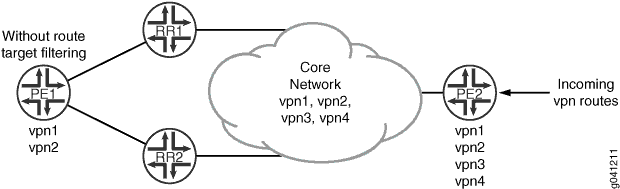
この例では、BGPルートターゲットフィルタリングは、ルートリフレクタ(デバイスRR1およびデバイスRR2)とプロバイダーエッジ(PE)デバイスPE2で設定されていますが、もう1つのPEであるデバイスPE1は、BGPルートターゲットフィルタリング機能をサポートしていません。デバイスPE2には、4つのVPN(vpn1、vpn2、vpn3、vpn4)が設定されています。デバイスPE1には2つのVPN(vpn1およびvpn2)が設定されているため、このデバイスはvpn1とvpn2のルート更新の受信にのみ関心があります。現在、これは不可能です。ルートリフレクタ(デバイスRR1とデバイスRR2)の両方が、すべての受信VPNルート(vpn1~vpn4)に関する情報をデバイスPE1で学習および共有するためです。サンプルトポロジーでは、すべてのデバイスが自律システム(AS)203に参加し、OSPFは設定された内部ゲートウェイプロトコル(IGP)であり、LDPはVPNで使用されるシグナリングプロトコルです。この例では、VPNルーティングおよび転送(VRF)インスタンスで静的ルートを使用してVPNルートを生成します。これは、OSPFやBGPなどのPEからカスタマーエッジ(CE)プロトコルを使用する代わりに行われます。
デバイスPE1で処理されるVPNルート更新の数を最小限に抑えるために、各ルートリフレクタにプロキシBGPルートターゲットフィルタリングを設定する ステートメントを含 family route-target proxy-generate めます。各ルートリフレクタは、デバイスPE1とのピアリングセッションを持ち、コアへのルートターゲットフィルタリングをサポートしています。ただし、デバイス PE1 はルート ターゲット フィルタリングをサポートしていないため、すべての VPN アップデートを受信するため、ネットワーク リソースの節約はデバイス PE1 によって実現されません。デバイスPE1に接続するピアリングセッションにプロキシBGPルートターゲットフィルタリングを設定することで、デバイスPE1で処理されるVPN更新の数を制限し、ルートリフレクタはネットワーク全体でデバイスPE1のプロキシBGPルートターゲットルートを生成します。
構成
CLI クイックコンフィギュレーション
この例を迅速に設定するには、以下のコマンドをコピーしてテキスト ファイルに貼り付け、改行を削除し、ネットワーク設定に合わせて必要な詳細を変更してから、 階層レベルの CLI にコマンドを [edit] コピー アンド ペーストします。
デバイスPE1
set interfaces ge-1/0/0 unit 0 description PE1-to-RR1
set interfaces ge-1/0/0 unit 0 family inet address 10.49.0.1/30
set interfaces ge-1/0/0 unit 0 family mpls
set interfaces ge-1/0/1 unit 0 description PE1-to-RR2
set interfaces ge-1/0/1 unit 0 family inet address 10.49.10.1/30
set interfaces ge-1/0/1 unit 0 family mpls
set protocols ldp interface ge-1/0/0
set protocols ldp interface ge-1/0/1
set protocols bgp group internal type internal
set protocols bgp group internal local-address 10.255.163.58
set protocols bgp group internal neighbor 10.255.165.220 family inet-vpn unicast
set protocols bgp group internal neighbor 10.255.165.28 family inet-vpn unicast
set protocols ospf area 0.0.0.0 interface ge-1/0/0
set protocols ospf area 0.0.0.0 interface ge-1/0/1
set protocols ospf area 0.0.0.0 interface lo0.0 passive
set routing-options route-distinguisher-id 10.255.163.58
set routing-options autonomous-system 203
set routing-instances vpn1 instance-type vrf
set routing-instances vpn1 vrf-target target:203:100
set routing-instances vpn1 routing-options static route 203.0.113.1/24 discard
set routing-instances vpn2 instance-type vrf
set routing-instances vpn2 vrf-target target:203:101
set routing-instances vpn2 routing-options static route 203.0.113.2/24 discard
デバイスRR1
set interfaces ge-1/0/0 unit 0 description RR1-to-PE1
set interfaces ge-1/0/0 unit 0 family inet address 10.49.0.2/30
set interfaces ge-1/0/0 unit 0 family mpls
set interfaces ge-1/0/1 unit 0 description RR1-to-PE2
set interfaces ge-1/0/1 unit 0 family inet address 10.50.0.2/30
set interfaces ge-1/0/1 unit 0 family mpls
set protocols ldp interface ge-1/0/0
set protocols ldp interface ge-1/0/1
set protocols bgp group internal type internal
set protocols bgp group internal local-address 198.51.100.1
set protocols bgp group internal cluster 198.51.100.1
set protocols bgp group internal neighbor 10.255.163.58 description vpn1-to-pe1 family inet-vpn unicast
set protocols bgp group internal neighbor 10.255.163.58 family route-target proxy-generate
set protocols bgp group internal neighbor 10.255.168.42 description vpn1-to-pe2 family inet-vpn unicast
set protocols bgp group internal neighbor 10.255.168.42 family route-target
set protocols ospf area 0.0.0.0 interface ge-1/0/0
set protocols ospf area 0.0.0.0 interface ge-1/0/1
set protocols ospf area 0.0.0.0 interface lo0.0 passive
set routing-options route-distinguisher-id 10.255.165.220
set routing-options autonomous-system 203
デバイスRR2
set interfaces ge-1/0/0 unit 0 description RR2-to-PE1
set interfaces ge-1/0/0 unit 0 family inet address 10.49.10.2/30
set interfaces ge-1/0/0 unit 0 family mpls
set interfaces ge-1/0/1 unit 0 description RR2-to-PE2
set interfaces ge-1/0/1 unit 0 family inet address 10.50.10.2/30
set interfaces ge-1/0/1 unit 0 family mpls
set protocols ldp interface ge-1/0/0
set protocols ldp interface ge-1/0/1
set protocols bgp group internal type internal
set protocols bgp group internal local-address 10.255.165.28
set protocols bgp group internal cluster 198.51.100.1
set protocols bgp group internal neighbor 10.255.163.58 description vpn2-to-pe1 family inet-vpn unicast
set protocols bgp group internal neighbor 10.255.163.58 family route-target proxy-generate
set protocols bgp group internal neighbor 10.255.168.42 description vpn2-to-pe2 family inet-vpn unicast
set protocols bgp group internal neighbor 10.255.168.42 family route-target
set protocols ospf area 0.0.0.0 interface ge-1/0/0
set protocols ospf area 0.0.0.0 interface ge-1/0/1
set protocols ospf area 0.0.0.0 interface lo0.0 passive
set routing-options route-distinguisher-id 10.255.165.28
set routing-options autonomous-system 203
デバイスPE2
set interfaces ge-1/0/0 unit 0 description PE2-to-RR1
set interfaces ge-1/0/0 unit 0 family inet address 10.50.0.1/30
set interfaces ge-1/0/0 unit 0 family mpls
set interfaces ge-1/0/1 unit 0 description PE2-to-RR2
set interfaces ge-1/0/1 unit 0 family inet address 10.50.10.1/30
set interfaces ge-1/0/1 unit 0 family mpls
set protocols ldp interface ge-1/0/0
set protocols ldp interface ge-1/0/1
set protocols bgp group internal type internal
set protocols bgp group internal local-address 10.255.168.42
set protocols bgp group internal family inet-vpn unicast
set protocols bgp group internal family route-target
set protocols bgp group internal neighbor 10.255.165.220
set protocols bgp group internal neighbor 10.255.165.28
set protocols ospf area 0.0.0.0 interface ge-1/0/0
set protocols ospf area 0.0.0.0 interface ge-1/0/1
set protocols ospf area 0.0.0.0 interface lo0.0 passive
set routing-options route-distinguisher-id 10.255.168.42
set routing-options autonomous-system 203
set routing-instances vpn1 instance-type vrf
set routing-instances vpn1 vrf-target target:203:100
set routing-instances vpn1 routing-options static route 203.0.113.1/24 discard
set routing-instances vpn2 instance-type vrf
set routing-instances vpn2 vrf-target target:203:101
set routing-instances vpn2 routing-options static route 203.0.113.2/24 discard
set routing-instances vpn3 instance-type vrf
set routing-instances vpn3 vrf-target target:203:103
set routing-instances vpn3 routing-options static route 203.0.113.3/24 discard
set routing-instances vpn4 instance-type vrf
set routing-instances vpn4 vrf-target target:203:104
set routing-instances vpn4 routing-options static route 203.0.113.4/24 discard
デバイスPE1の設定
手順
次の例では、設定階層内のさまざまなレベルに移動する必要があります。CLIのナビゲーションについては、 設定モードでのCLIエディターの使用を参照してください。
デバイスPE1を設定するには:
インターフェイスを設定します。
[edit interfaces]
user@PE1# set ge-1/0/0 unit 0 description PE1-to-RR1
user@PE1# set ge-1/0/0 unit 0 family inet address 10.49.0.1/30
user@PE1# set ge-1/0/0 unit 0 family mpls
user@PE1# set ge-1/0/1 unit 0 description PE1-to-RR2
user@PE1# set ge-1/0/1 unit 0 family inet address 10.49.10.1/30
user@PE1# set ge-1/0/1 unit 0 family mpls
ルート識別とAS番号を設定します。
[edit routing-options]
user@PE1# set route-distinguisher-id 10.255.163.58
user@PE1# set autonomous-system 203
VPN で使用されるシグナリング プロトコルとして LDP を設定します。
[edit protocols ldp]
user@PE1# set interface ge-1/0/0
user@PE1# set interface ge-1/0/1
BGPを設定します。
[edit protocols bgp group internal]
user@PE1# set type internal
user@PE1# set local-address 10.255.163.58
user@PE1# set neighbor 10.255.165.220 family inet-vpn unicast
user@PE1# set neighbor 10.255.165.28 family inet-vpn unicast
OSPFを設定します。
[edit protocols ospf area 0.0.0.0]
user@PE1# set interface ge-1/0/0
user@PE1# set interface ge-1/0/1
user@PE1# set interface lo0.0 passive
VPN ルーティング インスタンスを設定します。
[edit routing-instances vpn1]
user@PE1# set instance-type vrf
user@PE1# set vrf-target target:203:100
user@PE1# set routing-options static route 203.0.113.1/24 discard
[edit routing-instances vpn2]
user@PE1# set instance-type vrf
user@PE1# set vrf-target target:203:101
user@PE1# set routing-options static route 203.0.113.2/24 discard
デバイスの設定が完了したら、設定をコミットします。
[edit]
user@PE1# commit
結果
設定モードから、 、show routing-optionsshow protocolsおよび のコマンドをshow interfaces入力して設定をshow routing-instances確認します。出力結果に意図した設定が表示されない場合は、この例の手順を繰り返して設定を修正します。
user@PE1# show interfaces
ge-1/0/0 {
    unit 0 {
        description PE1-to-RR1;
        family inet {
            address 10.49.0.1/30;
        }
        family mpls;
    }
}
ge-1/0/1 {
    unit 0 {
        description PE1-to-RR2;
        family inet {
            address 10.49.10.1/30;
        }
        family mpls;
    }
}
user@PE1# show protocols
bgp {
    group internal {
        type internal;
        local-address 10.255.163.58;
        neighbor 10.255.165.220 {
            family inet-vpn {
                unicast;
            }
        }
        neighbor 10.255.165.28 {
            family inet-vpn {
                unicast;
            }
        }
    }
}
ospf {
    area 0.0.0.0 {
        interface ge-1/0/0.0;
        interface ge-1/0/1.0;
        interface lo0.0 {
            passive;
        }
    }
}
ldp {
    interface ge-1/0/0.0;
    interface ge-1/0/1.0;
}
user@PE1# show routing-options
route-distinguisher-id 10.255.14.182;
autonomous-system 203;
user@PE1# show routing-instances
vpn1 {
    instance-type vrf;
    vrf-target target:203:100;
    routing-options {
        static {
            route 203.0.113.1/24 discard;
        }
    }
}
vpn2 {
    instance-type vrf;
    vrf-target target:203:101;
    routing-options {
        static {
            route 203.0.113.2/24 discard;
        }
    }
}
デバイスRR1の設定
手順
次の例では、設定階層内のさまざまなレベルに移動する必要があります。CLIのナビゲーションについては、 設定モードでのCLIエディターの使用を参照してください。
デバイスRR1を設定するには:
インターフェイスを設定します。
[edit interfaces]
user@RR1# set ge-1/0/0 unit 0 description RR1-to-PE1
user@RR1# set ge-1/0/0 unit 0 family inet address 10.49.0.2/30
user@RR1# set ge-1/0/0 unit 0 family mpls
user@RR1# set ge-1/0/1 unit 0 description RR1-to-PE2
user@RR1# set ge-1/0/1 unit 0 family inet address 10.50.0.2/30
user@RR1# set ge-1/0/1 unit 0 family mpls
ルート識別とAS番号を設定します。
[edit routing-options]
user@RR1# set route-distinguisher-id 10.255.165.220
user@RR1# set autonomous-system 203
VPN で使用されるシグナリング プロトコルとして LDP を設定します。
[edit protocols ldp]
user@RR1# set interface ge-1/0/0
user@RR1# set interface ge-1/0/1
BGPを設定します。
[edit protocols bgp group internal]
user@RR1# set type internal
user@RR1# set local-address 10.255.165.220
user@RR1# set cluster 198.51.100.1
user@RR1# set neighbor 10.255.163.58 description vpn1-to-pe1 family inet-vpn unicast
user@RR1# set neighbor 10.255.168.42 description vpn1-to-pe2 family inet-vpn unicast
デバイスPE2とのピアリングセッションでBGPルートターゲットフィルタリングを設定します。
[edit protocols bgp group internal]
user@RR1# set neighbor 10.255.168.42 family route-target
デバイスPE1とのピアリングセッションでプロキシBGPルートターゲットフィルタリングを設定します。
[edit protocols bgp group internal]
user@RR1# set neighbor 10.255.163.58 family route-target proxy-generate
OSPFを設定します。
[edit protocols ospf area 0.0.0.0]
user@RR1# set interface ge-1/0/0
user@RR1# set interface ge-1/0/1
user@RR1# set interface lo0.0 passive
デバイスの設定が完了したら、設定をコミットします。
[edit]
user@RR1# commit
結果
設定モードから、 、 show protocols および show routing-options コマンドを入力して設定をshow interfaces確認します。出力結果に意図した設定が表示されない場合は、この例の手順を繰り返して設定を修正します。
user@RR1# show interfaces
ge-1/0/0 {
    unit 0 {
        description RR1-to-PE1;
        family inet {
            address 10.49.0.2/30;
        }
        family mpls;
    }
}
ge-1/0/1 {
    unit 0 {
        description RR1-to-PE2;
        family inet {
            address 10.50.0.2/30;
        }
        family mpls;
    }
}
user@RR1# show protocols
bgp {
    group internal {
        type internal;
        local-address 198.51.100.1;
        cluster 198.51.100.1;
        neighbor 10.255.163.58 {
            description vpn1-to-pe1;
            family inet-vpn {
                unicast;
            }
            family route-target {
                proxy-generate;
            }
        }
        neighbor 10.255.168.42 {
            description vpn1-to-pe2;
            family inet-vpn {
                unicast;
            }
            family route-target;
        }
    }
}
ospf {
    area 0.0.0.0 {
        interface ge-1/0/0.0;
        interface ge-1/0/1.0;
        interface lo0.0 {
            passive;
        }
    }
}
ldp {
    interface ge-1/0/0.0;
    interface ge-1/0/1.0;
}
user@RR1# show routing-options
route-distinguisher-id 10.255.165.220;
autonomous-system 203;
デバイスRR2の設定
手順
次の例では、設定階層内のさまざまなレベルに移動する必要があります。CLIのナビゲーションについては、 設定モードでのCLIエディターの使用を参照してください。
デバイスRR2を設定するには:
インターフェイスを設定します。
[edit interfaces]
user@RR2# set ge-1/0/0 unit 0 description RR2-to-PE1
user@RR2# set ge-1/0/0 unit 0 family inet address 10.49.10.2/30
user@RR2# set ge-1/0/0 unit 0 family mpls
user@RR2# set ge-1/0/1 unit 0 description RR2-to-PE2
user@RR2# set ge-1/0/1 unit 0 family inet address 10.50.10.2/30
user@RR2# set ge-1/0/1 unit 0 family mpls
ルート識別とAS番号を設定します。
[edit routing-options]
user@RR2# set route-distinguisher-id 10.255.165.28
user@RR2# set autonomous-system 203
VPN で使用されるシグナリング プロトコルとして LDP を設定します。
[edit protocols ldp]
user@RR2# set interface ge-1/0/0
user@RR2# set interface ge-1/0/1
BGPを設定します。
[edit protocols bgp group internal]
user@RR2# set type internal
user@RR2# set local-address 10.255.165.28
user@RR2# set cluster 198.51.100.1
user@RR2# set neighbor 10.255.163.58 description vpn2-to-pe1 family inet-vpn unicast
user@RR2# set neighbor 10.255.168.42 description vpn2-to-pe2 family inet-vpn unicast
デバイスPE2とのピアリングセッションでBGPルートターゲットフィルタリングを設定します。
[edit protocols bgp group internal]
user@RR2# set neighbor 10.255.168.42 family route-target
デバイスPE1とのピアリングセッションでプロキシBGPルートターゲットフィルタリングを設定します。
[edit protocols bgp group internal]
user@RR2# set neighbor 10.255.163.58 family route-target proxy-generate
OSPFを設定します。
[edit protocols ospf area 0.0.0.0]
user@RR2# set interface ge-1/0/0
user@RR2# set interface ge-1/0/1
user@RR2# set interface lo0.0 passive
デバイスの設定が完了したら、設定をコミットします。
[edit]
user@RR2# commit
結果
設定モードから、 、 、 show protocolsコマンドを入力して設定をshow interfacesshow routing-options確認します。出力結果に意図した設定が表示されない場合は、この例の手順を繰り返して設定を修正します。
user@RR2# show interfaces
ge-1/0/0 {
    unit 0 {
        description RR2-to-PE1;
        family inet {
            address 10.49.10.2/30;
        }
        family mpls;
    }
}
ge-1/0/1 {
    unit 0 {
        description RR2-to-PE2;
        family inet {
            address 10.50.10.2/30;
        }
        family mpls;
    }
}
user@RR2# show protocols
bgp {
    group internal {
        local-address 10.255.165.28;
        cluster 198.51.100.1;
        neighbor 10.255.163.58 {
            description vpn2-to-pe1;
            family inet-vpn {
                unicast;
            }
            family route-target {
                proxy-generate;
            }
        }
        neighbor 10.255.168.42 {
            description vpn2-to-pe2;
            family inet-vpn {
                unicast;
            }
            family route-target;
        }
    }
}
ospf {
    area 0.0.0.0 {
        interface ge-1/0/0.0;
        interface ge-1/0/1.0;
        interface lo0.0 {
            passive;
        }
    }
}
ldp {
    interface ge-1/0/0.0;
    interface ge-1/0/1.0;
}
user@RR2# show routing-options
route-distinguisher-id 10.255.165.28;
autonomous-system 203;
デバイスPE2の設定
手順
次の例では、設定階層内のさまざまなレベルに移動する必要があります。CLIのナビゲーションについては、 設定モードでのCLIエディターの使用を参照してください。
デバイスPE2を設定するには:
インターフェイスを設定します。
[edit interfaces]
user@PE2# set ge-1/0/0 unit 0 description PE2-to-RR1
user@PE2# set ge-1/0/0 unit 0 family inet address 10.50.0.1/30
user@PE2# set ge-1/0/0 unit 0 family mpls
user@PE2# set ge-1/0/1 unit 0 description PE2-to-RR2
user@PE2# set ge-1/0/1 unit 0 family inet address 10.50.10.1/30
user@PE2# set ge-1/0/1 unit 0 family mpls
ルート識別とAS番号を設定します。
[edit routing-options]
user@PE2# set route-distinguisher-id 10.255.168.42
user@PE2# set autonomous-system 203
VPN で使用されるシグナリング プロトコルとして LDP を設定します。
[edit protocols ldp]
user@PE2# set interface ge-1/0/0
user@PE2# set interface ge-1/0/1
BGPを設定します。
[edit protocols bgp group internal]
user@PE2# set type internal
user@PE2# set local-address 10.255.168.42
user@PE2# set family inet-vpn unicast
user@PE2# set family route-target
user@PE2# set neighbor 10.255.165.220
user@PE2# set neighbor 10.255.165.28
OSPFを設定します。
[edit protocols ospf area 0.0.0.0]
user@PE2# set interface ge-1/0/0
user@PE2# set interface ge-1/0/1
user@PE2# set interface lo0.0 passive
VPN ルーティング インスタンスを設定します。
[edit routing-instances vpn1]
user@PE2# set instance-type vrf
user@PE2# set vrf-target target:203:100
user@PE2# set routing-options static route 203.0.113.1/24 discard
[edit routing-instances vpn2]
user@PE2# set instance-type vrf
user@PE2# set vrf-target target:203:101
user@PE2# set routing-options static route 203.0.113.2/24 discard
[edit routing-instances vpn3]
user@PE2# set instance-type vrf
user@PE2# set vrf-target target:203:103
user@PE2# set routing-options static route 203.0.113.3/24 discard
[edit routing-instances vpn4]
user@PE2# set instance-type vrf
user@PE2# set vrf-target target:203:104
user@PE2# set routing-options static route 203.0.113.4/24 discard
デバイスの設定が完了したら、設定をコミットします。
[edit]
user@PE2# commit
結果
設定モードから、 、show routing-optionsshow protocolsおよび のコマンドをshow interfaces入力して設定をshow routing-instances確認します。出力結果に意図した設定が表示されない場合は、この例の手順を繰り返して設定を修正します。
user@PE2# show interfaces
ge-1/0/0 {
    unit 0 {
        description PE2-to-RR1;
        family inet {
            address 10.50.0.1/30;
        }
        family mpls;
    }
}
ge-1/0/1 {
    unit 0 {
        description PE2-to-RR2;
        family inet {
            address 10.50.10.1/30;
        }
        family mpls;
    }
}
user@PE2# show protocols
bgp {
    group internal {
        type internal;
        local-address 10.255.168.42;
        family inet-vpn {
            unicast;
        }
        family route-target;
        neighbor 10.255.165.220;
        neighbor 10.255.165.28;
    }
}
ospf {
    area 0.0.0.0 {
        interface ge-1/0/0.0;
        interface ge-1/0/1.0;
        interface lo0.0 {
            passive;
        }
    }
}
ldp {
    interface ge-1/0/0.0;
    interface ge-1/0/1.0;
}
user@PE2# show routing-options
route-distinguisher-id 10.255.168.42;
autonomous-system 203;
user@PE2# show routing-instances
vpn1 {
    instance-type vrf;
    vrf-target target:203:100;
    routing-options {
        static {
            route 203.0.113.1/24 discard;
        }
    }
}
vpn2 {
    instance-type vrf;
    vrf-target target:203:101;
    routing-options {
        static {
            route 203.0.113.2/24 discard;
        }
    }
}
vpn3 {
    instance-type vrf;
    vrf-target target:203:103;
    routing-options {
        static {
            route 203.0.113.3/24 discard;
        }
    }
}
vpn4 {
    instance-type vrf;
    vrf-target target:203:104;
    routing-options {
        static {
            route 203.0.113.4/24 discard;
        }
    }
}
検証
設定が正しく機能していることを確認します。
プロキシBGPルートターゲットルートの検証
目的
プロキシBGPルートターゲットルートが、デバイスRR1のbgp.rtarget.0テーブルに表示されていることを確認します。
アクション
運用モードから、 コマンドを show route table bgp.rtartget.0 入力してプロキシBGPルートターゲットを表示します。
user@RR1# show route table bgp.rtarget.0
4 destinations, 6 routes (4 active, 0 holddown, 0 hidden)
+ = Active Route, - = Last Active, * = Both

203:203:100/96
                   *[RTarget/5] 00:01:22
                      Type Proxy
                        for 10.255.163.58
                         Local
                    [BGP/170] 00:04:55, localpref 100, from 10.255.168.42
                      AS path: I, validation-state: unverified
                    > to 10.50.0.1 via ge-1/0/1
203:203:101/96
                   *[RTarget/5] 00:01:22
                      Type Proxy
                        for 10.255.163.58
                         Local
                    [BGP/170] 00:04:55, localpref 100, from 10.255.168.42
                      AS path: I, validation-state: unverified
                    > to 10.50.0.1 via ge-1/0/1
203:203:103/96
                   *[BGP/170] 00:04:55, localpref 100, from 10.255.168.42
                      AS path: I, validation-state: unverified
                    > to 10.50.0.1 via ge-1/0/1
203:203:104/96
                   *[BGP/170] 00:04:55, localpref 100, from 10.255.168.42
                      AS path: I, validation-state: unverified
                    > to 10.50.0.1 via ge-1/0/1
意味
デバイスRR1は、ピアデバイスPE1に代わってプロキシBGPルートターゲットルートを生成しています。プロキシBGPルートターゲットルートは、 のプロトコルと優先度 [RTarget/5] 、ルートターゲットタイプ Proxyで識別されます。