
예: IS-IS(Intermediate System to Intermediate System)와 LDP 간의 동기화 구성
이 예에서는 IS-IS(Intermediate System to Intermediate System)와 LDP 간의 동기화를 활성화하는 방법을 보여줍니다.
요구 사항
시작하기 전에 IS-IS(Intermediate System to Intermediate System) 및 LDP를 구성하십시오. 예를 들어 예: 경로 리플렉션 및 AS 재정의를 사용하여 레이어 3 VPN 구성을 참조하십시오.
개요
LDP는 non-traffic-engineered 애플리케이션에 레이블을 배포합니다. 레이블은 IS-IS에 의해 결정된 최상의 경로를 따라 배포됩니다. LDP와 IS-IS 사이의 동기화가 끊어지면, 레이블 스위칭 경로(LSP)가 중단됩니다. 따라서 LDP 및 IS-IS 동기화가 유익합니다. LDP 동기화가 구성되고 LDP가 주어진 링크에서 완전히 작동하지 않으면(세션이 설정되지 않고 레이블이 교환되지 않음) IS-IS(Intermediate System to Intermediate System)는 최대 비용 메트릭으로 링크를 광고합니다. 링크는 선호되지 않지만 네트워크 토폴로지에 유지됩니다.
LDP 동기화는 IS-IS(Intermediate System to Intermediate System)에서 점대점(point-to-point) 인터페이스와 점대점(point-to-point) 인터페이스로 구성된 LAN 인터페이스에서만 지원됩니다. LDP 동기화는 GR(Graceful Restart) 중에 지원되지 않습니다.
LDP 동기화를 위해 LDP가 작동할 때까지 최대 비용 메트릭을 광고하려면 문을 포함합니다.ldp-synchronization
ldp-synchronization {
    disable;
    hold-time seconds;
}
동기화를 disable 비활성화하려면 문을 포함합니다. 완전히 작동하지 않는 링크에 대해 최대 비용 메트릭을 광고하는 기간을 구성하려면 문을 포함합니다 hold-time .
인터페이스가 3분 이상 홀드다운 상태에 있으면 경고 수준의 시스템 로그 메시지가 전송됩니다. 이 메시지는 메시지 파일과 추적 파일 모두에 나타납니다.
그림 1 은 이 예에서 사용되는 토폴로지입니다.
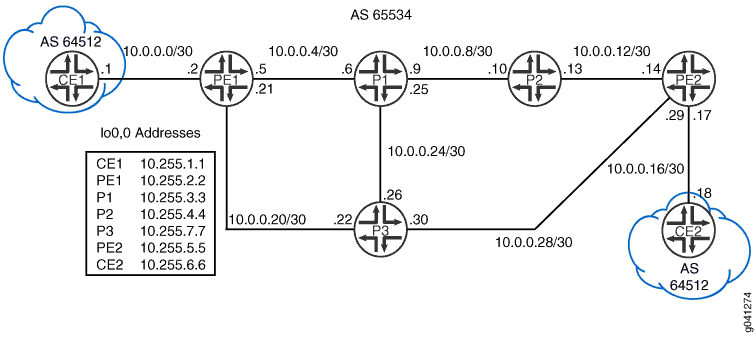
이 예는 디바이스 P1의 단계를 설명합니다.
구성
절차
CLI 빠른 구성
이 예를 빠르게 구성하려면, 아래 명령을 복사하여 텍스트 파일로 붙여 넣은 다음 모든 라인브레이크를 제거하고, 네트워크 구성을 일치하는 데 필요한 세부 사항을 바꾸고 계층 수준에서 명령을 CLI [edit] 로 복사해 붙여 넣습니다.
디바이스 P1
set protocols mpls interface all
set protocols mpls interface fxp0.0 disable
set protocols isis interface all
set protocols isis interface all ldp-synchronization
set protocols isis interface all point-to-point
set protocols isis interface fxp0.0 disable
set protocols ldp interface all
set protocols ldp interface fxp0.0 disable
인터페이스에서 프로토콜을 활성화하는 방법을 사용하여 interface all LDP 동기화 기능에 더 잘 집중할 수 있도록 구성을 짧게 유지합니다. 프로덕션 네트워크에서는 의도하지 않은 인터페이스에서 프로토콜이 실수로 활성화되는 것을 방지하기 위해 각 프로토콜 아래에 각 인터페이스를 명시적으로 나열하는 것이 가장 좋습니다.
인터페이스 all 메서드를 사용할 때는 여기에 표시된 것처럼 모든 프로토콜에 대해 일관되게 사용하는 것이 좋습니다. 이 경우 적절한 작동을 위해 프로토콜이 필요한 인터페이스에서 프로토콜 지원을 실수로 생략하지 않도록 하는 데 도움이 됩니다.
단계별 절차
다음 예제에서는 구성 계층에서 다양한 수준의 탐색이 필요합니다. CLI 탐색에 관한 정보는 CLI 사용자 가이드에서 구성 모드에서 CLI 편집기 사용을 참조하십시오.
IS-IS(Intermediate System to Intermediate System)와 LDP 간의 동기화 구성:
-
인터페이스에서 MPLS를 활성화합니다
[edit protocols mpls]
user@P1# set interface all
user@P1# set interface fxp0.0 disable
-
인터페이스에서 IS-IS(Intermediate System to Intermediate System)를 활성화합니다.
[edit protocols isis]
user@P1# set interface all
user@P1# set interface fxp0.0 disable
-
인터페이스에 LDP를 활성화합니다.
[edit protocols ldp]
user@P1# set interface all
user@P1# set interface fxp0.0 disable
-
IS-IS 인터페이스에서 LDP 동기화를 활성화합니다.
[edit protocols isis interface all]
user@P1# set ldp-synchronization
-
IS-IS 인터페이스가 포인트 투 포인트 인터페이스처럼 동작하도록 구성합니다.
[edit protocols isis interface all]
user@P1# set point-to-point
결과
구성 모드에서 명령을 입력하여 show protocols 구성을 확인합니다. 출력 결과가 의도한 구성대로 표시되지 않으면 이 예의 지침을 반복하여 구성을 수정하십시오.
user@P1# show protocols
mpls {
    interface all;
    interface fxp0.0 {
        disable;
    }
}
isis {
    interface all {
        ldp-synchronization;
        point-to-point;
    }
    interface fxp0.0 {
        disable;
    }
}
ldp {
    interface all;
    interface fxp0.0 {
        disable;
    }
}
디바이스 구성을 마쳤으면 구성 모드에서 을(를) 입력합니다 commit . 디바이스 R2에서 구성을 반복합니다.
확인
구성이 올바르게 작동하고 있는지 확인합니다.
LDP 동기화 확인
목적
IS-IS 인터페이스에서 LDP 동기화 설정을 확인합니다.
행동
운영 모드에서 명령을 입력합니다 show isis interface extensive .
user@P1> show isis interface extensive
IS-IS interface database:
lo0.0
  Index: 113, State: 0x6, Circuit id: 0x1, Circuit type: 0
  LSP interval: 100 ms, CSNP interval: disabled, Loose Hello padding
  Adjacency advertisement: Advertise
  Level 1
    Adjacencies: 0, Priority: 64, Metric: 0
    Passive
  Level 2
    Adjacencies: 0, Priority: 64, Metric: 0
    Passive
ge-1/2/0.0
  Index: 116, State: 0x6, Circuit id: 0x1, Circuit type: 2
  LSP interval: 100 ms, CSNP interval: 15 s, Loose Hello padding
  Adjacency advertisement: Advertise
  LDP sync state: in sync, for: 17:22:06, reason: LDP up during config
  config holdtime: infinity
  Level 2
    Adjacencies: 1, Priority: 64, Metric: 10
    Hello Interval: 9.000 s, Hold Time: 27 s
ge-1/2/1.0
  Index: 114, State: 0x6, Circuit id: 0x1, Circuit type: 2
  LSP interval: 100 ms, CSNP interval: 15 s, Loose Hello padding
  Adjacency advertisement: Advertise
  LDP sync state: in sync, for: 17:22:06, reason: LDP up during config
  config holdtime: infinity
  Level 2
    Adjacencies: 1, Priority: 64, Metric: 10
    Hello Interval: 9.000 s, Hold Time: 27 s
ge-1/2/2.0
  Index: 115, State: 0x6, Circuit id: 0x1, Circuit type: 2
  LSP interval: 100 ms, CSNP interval: 15 s, Loose Hello padding
  Adjacency advertisement: Advertise
  LDP sync state: in sync, for: 17:22:06, reason: LDP up during config
  config holdtime: infinity
  Level 2
    Adjacencies: 1, Priority: 64, Metric: 10
    Hello Interval: 9.000 s, Hold Time: 27 s
의미
출력은 LDP가 IS-IS(Intermediate System to Intermediate System)와 동기화되었음을 보여줍니다.