
EN ESTA PÁGINA
Ejemplo: Configuración de la interoperabilidad VPLS basada en BGP Y LDP H-VPLS
En este ejemplo, se muestra cómo configurar el servicio LAN privado virtual jerárquico (H-VPLS) en un escenario en el que se utilizan VPLS basado en LDP y VPLS basado en BGP que interoperan en una implementación de multiconexión. Este escenario es útil cuando la implementación de un cliente tiene los dos tipos diferentes de VPLS en uso y necesita integrarlos. Otro ejemplo es cuando el ISP-A ejecuta VPLS basado en BGP y el ISP-B ejecuta VPLS basado en LDP, y los dos ISP fusionan sus redes.
Requisitos
No se necesita ninguna configuración especial más allá de la inicialización del dispositivo antes de configurar este ejemplo.
Descripción general
En este ejemplo, los dispositivos PE2 y PE3 actúan como enrutadores perimetrales del proveedor (PE) con terminación VPLS basada en BGP y en LDP.
Los dispositivos de este ejemplo tienen las siguientes funciones:
BGP Solo VPLS PE: dispositivo PE1
LDP solo VPLS PE—Dispositivo PE4
BGP-LDP VPLS PE: dispositivo PE2 y PE3
En la figura 1 , se muestra la topología utilizada en este ejemplo.
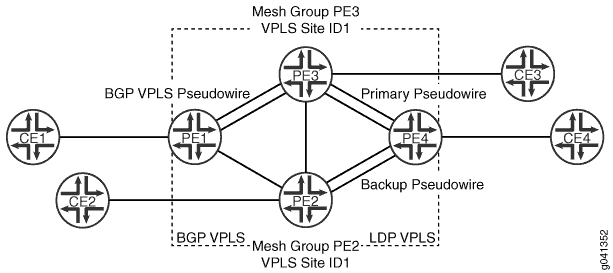
Desde el dispositivo PE4, el pseudocable al dispositivo PE3 es la ruta principal o operativa. El dispositivo pseudocable PE2 es la ruta de respaldo.
Configuración rápida de la CLI muestra la configuración de todos los dispositivos en la Figura 1. En la sección Procedimiento paso a paso se describen los pasos en los dispositivos PE1, PE2 y PE4.
Configuración
Procedimiento
- Configuración rápida de CLI
- Procedimiento paso a paso
- Procedimiento paso a paso
- Procedimiento paso a paso
- Resultados
Configuración rápida de CLI
Para configurar rápidamente este ejemplo, copie los siguientes comandos, péguelos en un archivo de texto, elimine los saltos de línea, cambie los detalles necesarios para que coincidan con su configuración de red y, luego, copie y pegue los comandos en la CLI en el nivel jerárquico [edit] .
Dispositivo PE1
set interfaces ge-2/0/5 encapsulation ethernet-vpls
set interfaces ge-2/0/5 unit 0 description to_CE1
set interfaces ge-2/0/5 unit 0 family vpls
set interfaces fe-2/0/9 unit 0 description to_PE2
set interfaces fe-2/0/9 unit 0 family inet address 10.10.3.1/30
set interfaces fe-2/0/9 unit 0 family mpls
set interfaces fe-2/0/10 unit 0 description to_PE3
set interfaces fe-2/0/10 unit 0 family inet address 10.10.1.1/30
set interfaces fe-2/0/10 unit 0 family mpls
set interfaces lo0 unit 0 family inet address 192.0.2.1/24
set protocols mpls interface fe-2/0/10.0
set protocols mpls interface fe-2/0/9.0
set protocols ldp interface fe-2/0/10.0
set protocols ldp interface fe-2/0/9.0
set protocols ldp interface lo0.0
set protocols bgp group internal-peers type internal
set protocols bgp group internal-peers local-address 192.0.2.1
set protocols bgp group internal-peers family l2vpn signaling
set protocols bgp group internal-peers neighbor 192.0.2.2
set protocols bgp group internal-peers neighbor 192.0.2.3
set protocols ospf area 0.0.0.0 interface lo0.0 passive
set protocols ospf area 0.0.0.0 interface fe-2/0/10.0
set protocols ospf area 0.0.0.0 interface fe-2/0/9.0
set routing-instances h-vpls-PE1 instance-type vpls
set routing-instances h-vpls-PE1 interface ge-2/0/5.0
set routing-instances h-vpls-PE1 route-distinguisher 1:1
set routing-instances h-vpls-PE1 vrf-target target:1:1
set routing-instances h-vpls-PE1 protocols vpls interface ge-2/0/5.0
set routing-instances h-vpls-PE1 protocols vpls site PE1-vpls site-identifier 2
set routing-options autonomous-system 64510
Dispositivo PE2
set interfaces ge-2/0/6 encapsulation ethernet-vpls
set interfaces ge-2/0/6 unit 0 description to_CE2
set interfaces ge-2/0/6 unit 0 family vpls
set interfaces fe-2/0/8 unit 0 description to_PE3
set interfaces fe-2/0/8 unit 0 family inet address 10.10.4.2/30
set interfaces fe-2/0/8 unit 0 family mpls
set interfaces fe-2/0/9 unit 0 description to_PE4
set interfaces fe-2/0/9 unit 0 family inet address 10.10.5.1/30
set interfaces fe-2/0/9 unit 0 family mpls
set interfaces fe-2/0/10 unit 0 description to_PE1
set interfaces fe-2/0/10 unit 0 family inet address 10.10.3.2/30
set interfaces fe-2/0/10 unit 0 family mpls
set interfaces lo0 unit 0 family inet address 192.0.2.2/24
set protocols mpls interface fe-2/0/10.0
set protocols mpls interface fe-2/0/9.0
set protocols mpls interface fe-2/0/8.0
set protocols ldp interface fe-2/0/10.0
set protocols ldp interface fe-2/0/9.0
set protocols ldp interface fe-2/0/8.0
set protocols ldp interface lo0.0
set protocols bgp group ibgp type internal
set protocols bgp group ibgp local-address 192.0.2.2
set protocols bgp group ibgp family l2vpn signaling
set protocols bgp group ibgp neighbor 192.0.2.3
set protocols bgp group ibgp neighbor 192.0.2.1
set protocols ospf area 0.0.0.0 interface lo0.0 passive
set protocols ospf area 0.0.0.0 interface fe-2/0/10.0
set protocols ospf area 0.0.0.0 interface fe-2/0/9.0
set protocols ospf area 0.0.0.0 interface fe-2/0/8.0
set routing-instances h-vpls-PE2 instance-type vpls
set routing-instances h-vpls-PE2 interface ge-2/0/6.0
set routing-instances h-vpls-PE2 route-distinguisher 1:2
set routing-instances h-vpls-PE2 vrf-target target:1:1
set routing-instances h-vpls-PE2 protocols vpls interface ge-2/0/6.0
set routing-instances h-vpls-PE2 protocols vpls site PE2-vpls site-identifier 1
set routing-instances h-vpls-PE2 protocols vpls site PE2-vpls multi-homing
set routing-instances h-vpls-PE2 protocols vpls site PE2-vpls mesh-group h-vpls-PE2
set routing-instances h-vpls-PE2 protocols vpls vpls-id 100
set routing-instances h-vpls-PE2 protocols vpls mesh-group h-vpls-PE2 vpls-id 100
set routing-instances h-vpls-PE2 protocols vpls mesh-group h-vpls-PE2 local-switching
set routing-instances h-vpls-PE2 protocols vpls mesh-group h-vpls-PE2 neighbor 192.0.2.4
set routing-options autonomous-system 64510
Dispositivo PE3
set interfaces fe-2/0/8 unit 0 description to_PE2
set interfaces fe-2/0/8 unit 0 family inet address 10.10.4.1/30
set interfaces fe-2/0/8 unit 0 family mpls
set interfaces fe-2/0/9 unit 0 description to_PE4
set interfaces fe-2/0/9 unit 0 family inet address 10.10.6.1/30
set interfaces fe-2/0/9 unit 0 family mpls
set interfaces fe-2/0/10 unit 0 description to_PE1
set interfaces fe-2/0/10 unit 0 family inet address 10.10.1.2/30
set interfaces fe-2/0/10 unit 0 family mpls
set interfaces ge-2/1/3 encapsulation ethernet-vpls
set interfaces ge-2/1/3 unit 0 description to_CE3
set interfaces ge-2/1/3 unit 0 family vpls
set interfaces lo0 unit 0 family inet address 192.0.2.3/24
set protocols mpls interface fe-2/0/10.0
set protocols mpls interface fe-2/0/8.0
set protocols mpls interface fe-2/0/9.0
set protocols ldp interface fe-2/0/10.0
set protocols ldp interface fe-2/0/9.0
set protocols ldp interface fe-2/0/8.0
set protocols ldp interface lo0.0
set protocols bgp group internal-peers type internal
set protocols bgp group internal-peers local-address 192.0.2.3
set protocols bgp group internal-peers family l2vpn signaling
set protocols bgp group internal-peers neighbor 192.0.2.2
set protocols bgp group internal-peers neighbor 192.0.2.1
set protocols ospf traffic-engineering
set protocols ospf area 0.0.0.0 interface lo0.0 passive
set protocols ospf area 0.0.0.0 interface fe-2/0/10.0
set protocols ospf area 0.0.0.0 interface fe-2/0/8.0
set protocols ospf area 0.0.0.0 interface fe-2/0/9.0
set routing-instances h-vpls-PE3 instance-type vpls
set routing-instances h-vpls-PE3 interface ge-2/1/3.0
set routing-instances h-vpls-PE3 route-distinguisher 1:3
set routing-instances h-vpls-PE3 vrf-target target:1:1
set routing-instances h-vpls-PE3 protocols vpls interface ge-2/1/3.0
set routing-instances h-vpls-PE3 protocols vpls site PE3-vpls site-identifier 1
set routing-instances h-vpls-PE3 protocols vpls site PE3-vpls multi-homing
set routing-instances h-vpls-PE3 protocols vpls site PE3-vpls mesh-group h-vpls-PE3
set routing-instances h-vpls-PE3 protocols vpls vpls-id 100
set routing-instances h-vpls-PE3 protocols vpls mesh-group h-vpls-PE3 vpls-id 100
set routing-instances h-vpls-PE3 protocols vpls mesh-group h-vpls-PE3 local-switching
set routing-instances h-vpls-PE3 protocols vpls mesh-group h-vpls-PE3 neighbor 192.0.2.4
set routing-options autonomous-system 64510
Dispositivo PE4
set interfaces fe-2/0/9 unit 0 description to_PE3
set interfaces fe-2/0/9 unit 0 family inet address 10.10.6.2/30
set interfaces fe-2/0/9 unit 0 family mpls
set interfaces fe-2/0/10 unit 0 description to_PE2
set interfaces fe-2/0/10 unit 0 family inet address 10.10.5.2/30
set interfaces fe-2/0/10 unit 0 family mpls
set interfaces ge-2/1/7 encapsulation ethernet-vpls
set interfaces ge-2/1/7 unit 0 description to_CE4
set interfaces ge-2/1/7 unit 0 family vpls
set interfaces lo0 unit 0 family inet address 192.0.2.4/24
set protocols mpls interface fe-2/0/10.0
set protocols mpls interface fe-2/0/9.0
set protocols ldp interface fe-2/0/10.0
set protocols ldp interface fe-2/0/9.0
set protocols ldp interface lo0.0
set protocols ospf area 0.0.0.0 interface lo0.0 passive
set protocols ospf area 0.0.0.0 interface fe-2/0/10.0
set protocols ospf area 0.0.0.0 interface fe-2/0/9.0
set routing-instances ldp-vpls instance-type vpls
set routing-instances ldp-vpls interface ge-2/1/7.0
set routing-instances ldp-vpls protocols vpls vpls-id 100
set routing-instances ldp-vpls protocols vpls neighbor 192.0.2.3
set routing-instances ldp-vpls protocols vpls neighbor 192.0.2.2
Dispositivo CE1
set interfaces ge-2/0/8 unit 0 description to_PE1
set interfaces ge-2/0/8 unit 0 family inet address 172.16.0.1/24
set interfaces lo0 unit 0 family inet address 10.255.14.214/32
set protocols ospf area 0.0.0.0 interface lo0.0 passive
set protocols ospf area 0.0.0.0 interface ge-2/0/8.0
Dispositivo CE2
set interfaces ge-2/1/5 unit 0 description to_PE2
set interfaces ge-2/1/5 unit 0 family inet address 172.16.0.2/24
set interfaces lo0 unit 0 family inet address 10.255.14.215/32
set protocols ospf area 0.0.0.0 interface lo0.0 passive
set protocols ospf area 0.0.0.0 interface ge-2/1/5.0
Dispositivo CE3
set interfaces ge-2/0/9 unit 0 description to_PE3
set interfaces ge-2/0/9 unit 0 family inet address 172.16.0.3/24
set interfaces lo0 unit 0 family inet address 10.255.14.218/32
set protocols ospf area 0.0.0.0 interface lo0.0 passive
set protocols ospf area 0.0.0.0 interface ge-2/0/9.0
Dispositivo CE4
set interfaces ge-2/1/6 unit 0 description to_PE4
set interfaces ge-2/1/6 unit 0 family inet address 172.16.0.4/24
set interfaces lo0 unit 0 family inet address 10.255.14.219/32
set protocols ospf area 0.0.0.0 interface lo0.0 passive
set protocols ospf area 0.0.0.0 interface ge-2/1/6.0
Procedimiento paso a paso
En el ejemplo siguiente, debe explorar por varios niveles en la jerarquía de configuración. Para obtener más información acerca de cómo navegar por la CLI, consulte Uso del editor de CLI en el modo de configuración de la Guía del usuario de CLI.
Para configurar el dispositivo de PE VPLS basado en BGP:
-
Configure las interfaces.
En la interfaz de dispositivo que se conecta al perímetro del cliente, habilite la encapsulación VPLS y la familia de direcciones VPLS.
En las interfaces frontales, habilite las etiquetas MPLS.
[edit interfaces]
user@PE1# set ge-2/0/5 encapsulation ethernet-vpls
user@PE1# set ge-2/0/5 unit 0 description to_CE1
user@PE1# set ge-2/0/5 unit 0 family vpls
user@PE1# set fe-2/0/10 unit 0 description to_PE3
user@PE1# set fe-2/0/10 unit 0 family inet address 10.10.1.1/30
user@PE1# set fe-2/0/10 unit 0 family mpls
user@PE1# set fe-2/0/9 unit 0 description to_PE2
user@PE1# set fe-2/0/9 unit 0 family inet address 10.10.3.1/30
user@PE1# set fe-2/0/9 unit 0 family mpls
user@PE1# set lo0 unit 0 family inet address 192.0.2.1/24
-
Active MPLS y LDP en las interfaces.
En las interfaces de dispositivo UMT que se conectan a otros dispositivos PE, configure MPLS y LDP.
[edit protocols mpls]
user@PE1# set interface fe-2/0/10.0
user@PE1# set interface fe-2/0/9.0
[edit protocols ldp ]
user@PE1# set interface fe-2/0/10.0
user@PE1# set interface fe-2/0/9.0
user@PE1# set interface lo0.0
-
Habilite el enrutamiento en las interfaces.
En las interfaces de dispositivo UMT que se conectan a otros dispositivos PE, configure un protocolo de pasarela interior (IGP), como OSPF o SI-SI.
[edit protocols ospf area 0.0.0.0]
user@PE1# set interface lo0.0 passive
user@PE1# set interface fe-2/0/10.0
user@PE1# set interface fe-2/0/9.0
-
Configure el BGP con la señalización VPN de capa 2.
La
l2vpn signalinginstrucción habilita la compatibilidad con anuncios VPLS y VPN de capa 2 con la misma información de accesibilidad de capa de red (NLRI).La malla completa del IBGP interno (IBGP) incluye los dispositivos PE1, PE2 y PE3. El dispositivo PE4 no está incluido.
[edit protocols bgp group internal-peers]
user@PE1# set type internal
user@PE1# set local-address 192.0.2.1
user@PE1# set family l2vpn signaling
user@PE1# set neighbor 192.0.2.2
user@PE1# set neighbor 192.0.2.3
-
Configure la instancia de enrutamiento VPLS.
Dado que se trata de VPLS basado en BGP, incluya un distinguidor de ruta, un destino VRF y un nombre e ID de sitio.
[edit routing-instances h-vpls-PE1]
user@PE1# set instance-type vpls
user@PE1# set interface ge-2/0/5.0
user@PE1# set route-distinguisher 1:1
user@PE1# set vrf-target target:1:1
[edit routing-instances h-vpls-PE1 protocols vpls]
user@PE1# set interface ge-2/0/5.0
user@PE1# set site PE1-vpls site-identifier 2
-
Configure el número de sistema autónomo (AS).
[edit routing-options]
user@PE1# set autonomous-system 64510
Procedimiento paso a paso
En el ejemplo siguiente, debe explorar por varios niveles en la jerarquía de configuración. Para obtener más información acerca de cómo navegar por la CLI, consulte Uso del editor de CLI en el modo de configuración de la Guía del usuario de CLI.
Para configurar el dispositivo de PE VPLS basado en BGP-LDP:
Configure las interfaces.
En la interfaz de dispositivo PE-r que se conecta al perímetro del cliente, configure uno de los tipos de encapsulación VPLS y la familia de direcciones VPLS. Esto habilita VPLS.
En las interfaces frontales, habilite las etiquetas MPLS.
[edit interfaces]
user@PE2# set ge-2/0/6 encapsulation ethernet-vpls
user@PE2# set ge-2/0/6 unit 0 description to_CE2
user@PE2# set ge-2/0/6 unit 0 family vpls
user@PE2# set fe-2/0/10 unit 0 description to_PE1
user@PE2# set fe-2/0/10 unit 0 family inet address 10.10.3.2/30
user@PE2# set fe-2/0/10 unit 0 family mpls
user@PE2# set fe-2/0/9 unit 0 description to_PE4
user@PE2# set fe-2/0/9 unit 0 family inet address 10.10.5.1/30
user@PE2# set fe-2/0/9 unit 0 family mpls
user@PE2# set fe-2/0/8 unit 0 description to_PE3
user@PE2# set fe-2/0/8 unit 0 family inet address 10.10.4.2/30
user@PE2# set fe-2/0/8 unit 0 family mpls
user@PE2# set lo0 unit 0 family inet address 192.0.2.2/24
Active MPLS y LDP en las interfaces.
En las interfaces de dispositivo UMT que se conectan a otros dispositivos PE, configure MPLS y LDP.
[edit protocols mpls]
user@PE2# set interface fe-2/0/10.0
user@PE2# set interface fe-2/0/9.0
user@PE2# set interface fe-2/0/8.0
[edit protocols ldp]
user@PE2# set interface fe-2/0/10.0
user@PE2# set interface fe-2/0/9.0
user@PE2# set interface fe-2/0/8.0
user@PE2# set interface lo0.0
Habilite el enrutamiento en las interfaces.
En las interfaces de dispositivo UMT que se conectan a otros dispositivos PE, configure un protocolo de pasarela interior (IGP), como OSPF o SI-SI.
[edit protocols ospf area 0.0.0.0]
user@PE2# set interface lo0.0 passive
user@PE2# set interface fe-2/0/10.0
user@PE2# set interface fe-2/0/9.0
user@PE2# set interface fe-2/0/8.0
Configure el BGP con la señalización VPN de capa 2.
La instrucción de señalización l2vpn habilita la compatibilidad con anuncios VPLS y VPN de capa 2 con la misma información de accesibilidad de capa de red (NLRI)
La malla completa del IBGP interno (IBGP) incluye los dispositivos PE1, PE2 y PE3. El dispositivo PE4 no está incluido.
[edit protocols bgp group ibgp]
user@PE2# set type internal
user@PE2# set local-address 192.0.2.2
user@PE2# set family l2vpn signaling
user@PE2# set neighbor 192.0.2.3
user@PE2# set neighbor 192.0.2.1
Configure VPLS.
La
vpls-idinstrucción habilita la señalización de LDP para la instancia VPLS.[edit routing-instances h-vpls-PE2] user@PE2# set instance-type vpls user@PE2# set interface ge-2/0/6.0 user@PE2# set route-distinguisher 1:2 user@PE2# set vrf-target target:1:1 [edit routing-instances h-vpls-PE2 protocols vpls] user@PE2# set interface ge-2/0/6.0 user@PE2# set site PE2-vpls site-identifier 1 user@PE2# set site PE2-vpls multi-homing user@PE2# set site PE2-vpls mesh-group h-vpls-PE2 user@PE2# set vpls-id 100 user@PE2# set mesh-group h-vpls-PE2 vpls-id 100 user@PE2# set mesh-group h-vpls-PE2 local-switching user@PE2# set mesh-group h-vpls-PE2 neighbor 192.0.2.4
Configure el número de sistema autónomo (AS).
[edit routing-options]
user@PE2# set autonomous-system 64510
Procedimiento paso a paso
En el ejemplo siguiente, debe explorar por varios niveles en la jerarquía de configuración. Para obtener más información acerca de cómo navegar por la CLI, consulte Uso del editor de CLI en el modo de configuración de la Guía del usuario de CLI.
Para configurar un dispositivo de PE VPLS basado en LDP:
Configure las interfaces.
En la interfaz de dispositivo PE-r que se conecta al perímetro del cliente, configure uno de los tipos de encapsulación VPLS y la familia de direcciones VPLS. Esto habilita VPLS.
En las interfaces frontales, habilite las etiquetas MPLS.
[edit interfaces]
user@PE4# set fe-2/0/10 unit 0 description to_PE2
user@PE4# set fe-2/0/10 unit 0 family inet address 10.10.5.2/30
user@PE4# set fe-2/0/10 unit 0 family mpls
user@PE4# set fe-2/0/9 unit 0 description to_PE3
user@PE4# set fe-2/0/9 unit 0 family inet address 10.10.6.2/30
user@PE4# set fe-2/0/9 unit 0 family mpls
user@PE4# set ge-2/1/7 encapsulation ethernet-vpls
user@PE4# set ge-2/1/7 unit 0 description to_CE4
user@PE4# set ge-2/1/7 unit 0 family vpls
user@PE4# set lo0 unit 0 family inet address 192.0.2.4/24
Active MPLS y LDP en las interfaces.
En las interfaces de dispositivo UMT que se conectan a otros dispositivos PE, configure MPLS y LDP.
[edit protocols mpls]
user@PE4# set interface fe-2/0/10.0
user@PE4# set interface fe-2/0/9.0
[edit protocols ldp]
user@PE4# set interface fe-2/0/10.0
user@PE4# set interface fe-2/0/9.0
user@PE4# set interface lo0.0
Habilite el enrutamiento en las interfaces.
En las interfaces de dispositivo UMT que se conectan a otros dispositivos PE, configure un protocolo de pasarela interior (IGP), como OSPF o SI-SI.
[edit protocols ospf area 0.0.0.0]
user@PE4# set interface lo0.0 passive
user@PE4# set interface fe-2/0/10.0
user@PE4# set interface fe-2/0/9.0
Configure VPLS.
La
vpls-idinstrucción habilita la señalización de LDP para la instancia VPLS.[edit routing-instances ldp-vpls] user@PE4# set instance-type vpls user@PE4# set interface ge-2/1/7.0 user@PE4# set protocols vpls vpls-id 100 [edit routing-instances ldp-vpls protocols vpls] user@PE4# set neighbor 192.0.2.3 user@PE4# set neighbor 192.0.2.2
Resultados
Desde el modo de configuración, ingrese los comandos , show protocolsy show routing-instancesshow routing-options para confirmar la show interfacesconfiguración. Si el resultado no muestra la configuración deseada, repita las instrucciones de este ejemplo para corregirla.
Dispositivo PE1
user@PE1# show interfaces
ge-2/0/5 {
    encapsulation ethernet-vpls;
    unit 0 {
        description to_CE1;
        family vpls;
    }
}
fe-2/0/9 {
}
    unit 0 {
        description to_PE2;
        family inet {
            address 10.10.3.1/30;
        }
        family mpls;
    }
}
fe-2/0/10 {
    unit 0 {
        description to_PE3;
        family inet {
            address 10.10.1.1/30;
        }
        family mpls;
    }
}
lo0 {
    unit 0 {
        family inet {
            address 192.0.2.1/24;
        }
    }
}
user@PE1# show protocols
mpls {
    interface fe-2/0/10.0;
    interface fe-2/0/9.0;
}
bgp {
    group internal-peers {
        type internal;
        local-address 192.0.2.1;
        family l2vpn {
            signaling;
        }
        neighbor 192.0.2.2;
        neighbor 192.0.2.3;
    }
}
ospf {
    area 0.0.0.0 {
        interface lo0.0 {
            passive;
        }
        interface fe-2/0/10.0;
        interface fe-2/0/9.0;
    }
}
ldp {
    interface fe-2/0/10.0;
    interface fe-2/0/9.0;
    interface lo0.0;
}
user@PE1# show routing-instances
h-vpls-PE1 {
    instance-type vpls;
    interface ge-2/0/5.0;
    route-distinguisher 1:1;
    vrf-target target:1:1;
    protocols {
        vpls {
            interface ge-2/0/5.0;
            site PE1-vpls {
                site-identifier 2;
            }
        }
    }
}
user@PE1# show routing-options
autonomous-system 64510;
Dispositivo PE2
user@PE2# show interfaces
ge-2/0/6 {
    encapsulation ethernet-vpls;
    unit 0 {
        description to_CE2;
        family vpls;
    }
}
fe-2/0/8 {
    unit 0 {
        description to_PE3;
        family inet {
            address 10.10.4.2/30;
        }
        family mpls;
    }
}
fe-2/0/9 {
    unit 0{
        description to_PE4;
        family inet {
            address 10.10.5.1/30;
        }
        family mpls;
    }
}
fe-2/0/10 {
    unit 0 {
        description to_PE1;
        family inet {
            address 10.10.3.2/30;
        }
        family mpls;
    }
}
lo0 {
    unit 0 {
        family inet {
            address 192.0.2.2/24;
        }
    }
}
user@PE2# show protocols
mpls {
    interface fe-2/0/10.0;
    interface fe-2/0/9.0;
    interface fe-2/0/8.0;
}
bgp {
    group ibgp {
        type internal;
        local-address 192.0.2.2;
        family l2vpn {
            signaling;
        }
        neighbor 192.0.2.3;
        neighbor 192.0.2.1;
    }
}
ospf {
    area 0.0.0.0 {
        interface lo0.0 {
            passive;
        }
        interface fe-2/0/10.0;
        interface fe-2/0/9.0;
        interface fe-2/0/8.0;
    }
}
ldp {
    interface fe-2/0/10.0;
    interface fe-2/0/9.0;
    interface fe-2/0/8.0;
    interface lo0.0;
}
user@PE2# show routing-instances
h-vpls-PE2 {
    instance-type vpls;
    interface ge-2/0/6.0;
    route-distinguisher 1:2;
    vrf-target target:1:1;
    protocols {
        vpls {
            interface ge-2/0/6.0;
            site PE2-vpls {
                site-identifier 1;
                multi-homing;
                mesh-group h-vpls-PE2;
            }
            vpls-id 100;
            mesh-group h-vpls-PE2 {
                vpls-id 100;
                local-switching;
                neighbor 192.0.2.4;
            }
        }
    }
}
user@PE2# show routing-options
autonomous-system 64510;
Dispositivo PE4
user@PE4# show interfaces
ge-2/1/7 {
    encapsulation ethernet-vpls;
    unit 0 {
        description to_CE4;
        family vpls;
    }
}
fe-2/0/9 {
    unit 0 {
        description to_PE3;
        family inet {
            address 10.10.6.2/30;
        }
        family mpls;
    }
}
fe-2/0/10 {
    unit 0 {
        description to_PE2;
        family inet {
            address 10.10.5.2/30;
        }
        family mpls;
    }
}
lo0 {
    unit 0 {
        family inet {
            address 192.0.2.4/24;
        }
    }
}
user@PE4# show protocols
mpls {
    interface fe-2/0/9.0;
    interface fe-2/0/10.0;
}
ospf {
    area 0.0.0.0 {
        interface lo0.0 {
            passive;
        }
        interface fe-2/0/9.0;
        interface fe-2/0/10.0;
    }
}
ldp {
    interface fe-2/0/10.0;
    interface fe-2/0/9.0;
    interface lo0.0;
}
user@PE4# show routing-instances
ldp-vpls {
    instance-type vpls;
    interface ge-2/1/7.0;
    protocols {
        vpls {
            vpls-id 100;
            neighbor 192.0.2.3;
            neighbor 192.0.2.2;
        }
    }
}
Cuando termine de configurar los dispositivos, ingrese commit desde el modo de configuración.
Verificación
Confirme que la configuración funcione correctamente. En un escenario de multiconexión con VPLS de BGP-LDP, los pseudocables de LDP están en estado inactivo para el PE de respaldo (dispositivo PE2). Mientras que en el PE VPLS solo de LDP (dispositivo PE4), los pseudocables al principal y a los dispositivos PE BGP-LDP de respaldo están en estado activo.
- Verificación de las conexiones VPLS
- Activación manual de un conmutador del pseudocable activo al pseudocable de respaldo
- Comprobación de la conectividad
- Comprobación de las tablas de enrutamiento VPN de capa 2 del BGP
- Comprobación de las tablas de enrutamiento de circuitos de capa 2
Verificación de las conexiones VPLS
Propósito
Compruebe que las conexiones VPLS funcionan como se espera.
Acción
Desde el modo operativo, introduzca el show vpls connections comando.
user@PE1> show vpls connections
Layer-2 VPN connections:

Legend for connection status (St)
EI -- encapsulation invalid      NC -- interface encapsulation not CCC/TCC/VPLS
EM -- encapsulation mismatch     WE -- interface and instance encaps not same
VC-Dn -- Virtual circuit down    NP -- interface hardware not present
CM -- control-word mismatch      -> -- only outbound connection is up
CN -- circuit not provisioned    <- -- only inbound connection is up
OR -- out of range               Up -- operational
OL -- no outgoing label          Dn -- down
LD -- local site signaled down   CF -- call admission control failure
RD -- remote site signaled down  SC -- local and remote site ID collision
LN -- local site not designated  LM -- local site ID not minimum designated
RN -- remote site not designated RM -- remote site ID not minimum designated
XX -- unknown connection status  IL -- no incoming label
MM -- MTU mismatch               MI -- Mesh-Group ID not available
BK -- Backup connection          ST -- Standby connection
PF -- Profile parse failure      PB -- Profile busy
RS -- remote site standby        SN -- Static Neighbor
LB -- Local site not best-site   RB -- Remote site not best-site
VM -- VLAN ID mismatch

Legend for interface status
Up -- operational
Dn -- down

Instance: h-vpls-PE1
  Local site: PE1-vpls (2)
    connection-site           Type  St     Time last up          # Up trans
    1                         rmt   Up     Oct 16 16:52:27 2012           1
      Remote PE: 192.0.2.2, Negotiated control-word: No
      Incoming label: 800016, Outgoing label: 800009
      Local interface: vt-2/0/10.51380738, Status: Up, Encapsulation: VPLS
        Description: Intf - vpls h-vpls-PE1 local site 2 remote site 1
user@PE2> show vpls connections
Layer-2 VPN connections:

Legend for connection status (St)
EI -- encapsulation invalid      NC -- interface encapsulation not CCC/TCC/VPLS
EM -- encapsulation mismatch     WE -- interface and instance encaps not same
VC-Dn -- Virtual circuit down    NP -- interface hardware not present
CM -- control-word mismatch      -> -- only outbound connection is up
CN -- circuit not provisioned    <- -- only inbound connection is up
OR -- out of range               Up -- operational
OL -- no outgoing label          Dn -- down
LD -- local site signaled down   CF -- call admission control failure
RD -- remote site signaled down  SC -- local and remote site ID collision
LN -- local site not designated  LM -- local site ID not minimum designated
RN -- remote site not designated RM -- remote site ID not minimum designated
XX -- unknown connection status  IL -- no incoming label
MM -- MTU mismatch               MI -- Mesh-Group ID not available
BK -- Backup connection          ST -- Standby connection
PF -- Profile parse failure      PB -- Profile busy
RS -- remote site standby        SN -- Static Neighbor
LB -- Local site not best-site   RB -- Remote site not best-site
VM -- VLAN ID mismatch

Legend for interface status
Up -- operational
Dn -- down

Instance: h-vpls-PE2
  BGP-VPLS State
  Local site: PE2-vpls (1)
    connection-site           Type  St     Time last up          # Up trans
    1                         rmt   RN
    2                         rmt   Up     Oct 16 17:12:31 2012           1
      Remote PE: 192.0.2.1, Negotiated control-word: No
      Incoming label: 800257, Outgoing label: 800000
      Local interface: vt-2/0/10.118489089, Status: Up, Encapsulation: VPLS
        Description: Intf - vpls h-vpls-PE2 local site 1 remote site 2
  LDP-VPLS State
  VPLS-id: 100
  Mesh-group connections: h-vpls-PE2
    Neighbor                  Type  St     Time last up          # Up trans
    192.0.2.4(vpls-id 100)      rmt   Up     Oct 16 17:12:30 2012           1
      Remote PE: 192.0.2.4, Negotiated control-word: No
      Incoming label: 800000, Outgoing label: 800001
      Negotiated PW status TLV: No
      Local interface: vt-2/0/10.118489088, Status: Up, Encapsulation: ETHERNET
        Description: Intf - vpls h-vpls-PE2 neighbor 192.0.2.4 vpls-id 100
user@PE3> show vpls connections
Layer-2 VPN connections:

Legend for connection status (St)
EI -- encapsulation invalid      NC -- interface encapsulation not CCC/TCC/VPLS
EM -- encapsulation mismatch     WE -- interface and instance encaps not same
VC-Dn -- Virtual circuit down    NP -- interface hardware not present
CM -- control-word mismatch      -> -- only outbound connection is up
CN -- circuit not provisioned    <- -- only inbound connection is up
OR -- out of range               Up -- operational
OL -- no outgoing label          Dn -- down
LD -- local site signaled down   CF -- call admission control failure
RD -- remote site signaled down  SC -- local and remote site ID collision
LN -- local site not designated  LM -- local site ID not minimum designated
RN -- remote site not designated RM -- remote site ID not minimum designated
XX -- unknown connection status  IL -- no incoming label
MM -- MTU mismatch               MI -- Mesh-Group ID not available
BK -- Backup connection          ST -- Standby connection
PF -- Profile parse failure      PB -- Profile busy
RS -- remote site standby        SN -- Static Neighbor
LB -- Local site not best-site   RB -- Remote site not best-site
VM -- VLAN ID mismatch

Legend for interface status
Up -- operational
Dn -- down

Instance: h-vpls-PE3
  BGP-VPLS State
  Local site: PE3-vpls (1)
    connection-site           Type  St     Time last up          # Up trans
    1                         rmt   LN
    2                         rmt   LN
  LDP-VPLS State
  VPLS-id: 100
  Mesh-group connections: h-vpls-PE3
    Neighbor                  Type  St     Time last up          # Up trans
    192.0.2.4(vpls-id 100)      rmt   LN
user@PE4> show vpls connections
Layer-2 VPN connections:

Legend for connection status (St)
EI -- encapsulation invalid      NC -- interface encapsulation not CCC/TCC/VPLS
EM -- encapsulation mismatch     WE -- interface and instance encaps not same
VC-Dn -- Virtual circuit down    NP -- interface hardware not present
CM -- control-word mismatch      -> -- only outbound connection is up
CN -- circuit not provisioned    <- -- only inbound connection is up
OR -- out of range               Up -- operational
OL -- no outgoing label          Dn -- down
LD -- local site signaled down   CF -- call admission control failure
RD -- remote site signaled down  SC -- local and remote site ID collision
LN -- local site not designated  LM -- local site ID not minimum designated
RN -- remote site not designated RM -- remote site ID not minimum designated
XX -- unknown connection status  IL -- no incoming label
MM -- MTU mismatch               MI -- Mesh-Group ID not available
BK -- Backup connection          ST -- Standby connection
PF -- Profile parse failure      PB -- Profile busy
RS -- remote site standby        SN -- Static Neighbor
LB -- Local site not best-site   RB -- Remote site not best-site
VM -- VLAN ID mismatch

Legend for interface status
Up -- operational
Dn -- down

Instance: ldp-vpls
  VPLS-id: 100
    Neighbor                  Type  St     Time last up          # Up trans
    192.0.2.2(vpls-id 100)      rmt   Up     Oct 16 17:12:23 2012           1
      Remote PE: 192.0.2.2, Negotiated control-word: No
      Incoming label: 800001, Outgoing label: 800000
      Negotiated PW status TLV: No
      Local interface: vt-2/0/10.17825793, Status: Up, Encapsulation: ETHERNET
        Description: Intf - vpls ldp-vpls neighbor 192.0.2.2 vpls-id 100
    192.0.2.3(vpls-id 100)      rmt   Up     Oct 16 17:12:20 2012           1
      Remote PE: 192.0.2.3, Negotiated control-word: No
      Incoming label: 800000, Outgoing label: 800000
      Negotiated PW status TLV: No
      Local interface: vt-2/0/10.17825792, Status: Up, Encapsulation: ETHERNET
        Description: Intf - vpls ldp-vpls neighbor 192.0.2.3 vpls-id 100
Significado
En el dispositivo PE1, la conexión BGP-VPLS con el dispositivo PE2 está activa. En una condición de estado estacionario, el dispositivo PE2 es el enrutador principal y tiene todos los pseudocables terminados en él. El tráfico fluye de CE1 a PE1 a PE2 a PE4 a CE4.
En el dispositivo PE2, la conexión BGP-VPLS con el dispositivo PE1 está activa. La conexión al dispositivo PE3 está en estado RN. La conexión LDP-VPLS con el dispositivo PE4 está activa.
En el dispositivo PE3, todas las conexiones VPLS están en estado LN. Esto es de esperar porque el dispositivo PE3 es la copia de seguridad.
En el dispositivo PE4, el enrutador VPLS solo LDP, el pseudocable principal al dispositivo PE2 y el pseudocable de respaldo al dispositivo PE3 están en estado activo.
Activación manual de un conmutador del pseudocable activo al pseudocable de respaldo
Propósito
Compruebe que cuando el dispositivo PE2 deje de estar disponible, el flujo de tráfico se desplace al dispositivo PE3.
Acción
En el dispositivo PE2, desactive las interfaces.
user@PE2# deactivate interfaces
user@PE2# commit
Vuelva a ejecutar el
show vpls connectionscomando en todos los dispositivos PE.user@PE1> show vpls connections Layer-2 VPN connections: Legend for connection status (St) EI -- encapsulation invalid NC -- interface encapsulation not CCC/TCC/VPLS EM -- encapsulation mismatch WE -- interface and instance encaps not same VC-Dn -- Virtual circuit down NP -- interface hardware not present CM -- control-word mismatch -> -- only outbound connection is up CN -- circuit not provisioned <- -- only inbound connection is up OR -- out of range Up -- operational OL -- no outgoing label Dn -- down LD -- local site signaled down CF -- call admission control failure RD -- remote site signaled down SC -- local and remote site ID collision LN -- local site not designated LM -- local site ID not minimum designated RN -- remote site not designated RM -- remote site ID not minimum designated XX -- unknown connection status IL -- no incoming label MM -- MTU mismatch MI -- Mesh-Group ID not available BK -- Backup connection ST -- Standby connection PF -- Profile parse failure PB -- Profile busy RS -- remote site standby SN -- Static Neighbor LB -- Local site not best-site RB -- Remote site not best-site VM -- VLAN ID mismatch Legend for interface status Up -- operational Dn -- down Instance: h-vpls-PE1 Local site: PE1-vpls (2) connection-site Type St Time last up # Up trans 1 rmt Up Oct 17 12:24:01 2012 2 Remote PE: 192.0.2.3, Negotiated control-word: No Incoming label: 800000, Outgoing label: 800257 Local interface: vt-2/0/10.84934656, Status: Up, Encapsulation: VPLS Description: Intf - vpls h-vpls-PE1 local site 2 remote site 1user@PE2> show vpls connections Layer-2 VPN connections: Legend for connection status (St) EI -- encapsulation invalid NC -- interface encapsulation not CCC/TCC/VPLS EM -- encapsulation mismatch WE -- interface and instance encaps not same VC-Dn -- Virtual circuit down NP -- interface hardware not present CM -- control-word mismatch -> -- only outbound connection is up CN -- circuit not provisioned <- -- only inbound connection is up OR -- out of range Up -- operational OL -- no outgoing label Dn -- down LD -- local site signaled down CF -- call admission control failure RD -- remote site signaled down SC -- local and remote site ID collision LN -- local site not designated LM -- local site ID not minimum designated RN -- remote site not designated RM -- remote site ID not minimum designated XX -- unknown connection status IL -- no incoming label MM -- MTU mismatch MI -- Mesh-Group ID not available BK -- Backup connection ST -- Standby connection PF -- Profile parse failure PB -- Profile busy RS -- remote site standby SN -- Static Neighbor LB -- Local site not best-site RB -- Remote site not best-site VM -- VLAN ID mismatch Legend for interface status Up -- operational Dn -- down Instance: h-vpls-PE2 BGP-VPLS State Local site: PE2-vpls (1) LDP-VPLS State VPLS-id: 100 Mesh-group connections: h-vpls-PE2 Neighbor Type St Time last up # Up trans 192.0.2.4(vpls-id 100) rmt OLuser@PE3> show vpls connections Layer-2 VPN connections: Legend for connection status (St) EI -- encapsulation invalid NC -- interface encapsulation not CCC/TCC/VPLS EM -- encapsulation mismatch WE -- interface and instance encaps not same VC-Dn -- Virtual circuit down NP -- interface hardware not present CM -- control-word mismatch -> -- only outbound connection is up CN -- circuit not provisioned <- -- only inbound connection is up OR -- out of range Up -- operational OL -- no outgoing label Dn -- down LD -- local site signaled down CF -- call admission control failure RD -- remote site signaled down SC -- local and remote site ID collision LN -- local site not designated LM -- local site ID not minimum designated RN -- remote site not designated RM -- remote site ID not minimum designated XX -- unknown connection status IL -- no incoming label MM -- MTU mismatch MI -- Mesh-Group ID not available BK -- Backup connection ST -- Standby connection PF -- Profile parse failure PB -- Profile busy RS -- remote site standby SN -- Static Neighbor LB -- Local site not best-site RB -- Remote site not best-site VM -- VLAN ID mismatch Legend for interface status Up -- operational Dn -- down Instance: h-vpls-PE3 BGP-VPLS State Local site: PE3-vpls (1) connection-site Type St Time last up # Up trans 2 rmt Up Oct 17 12:24:01 2012 1 Remote PE: 192.0.2.1, Negotiated control-word: No Incoming label: 800257, Outgoing label: 800000 Local interface: vt-2/0/10.135266304, Status: Up, Encapsulation: VPLS Description: Intf - vpls h-vpls-PE3 local site 1 remote site 2 LDP-VPLS State VPLS-id: 100 Mesh-group connections: h-vpls-PE3 Neighbor Type St Time last up # Up trans 192.0.2.4(vpls-id 100) rmt Up Oct 17 12:24:02 2012 1 Remote PE: 192.0.2.4, Negotiated control-word: No Incoming label: 800000, Outgoing label: 800000 Negotiated PW status TLV: No Local interface: vt-2/0/10.135266305, Status: Up, Encapsulation: ETHERNET Description: Intf - vpls h-vpls-PE3 neighbor 192.0.2.4 vpls-id 100user@PE4> show vpls connections Layer-2 VPN connections: Legend for connection status (St) EI -- encapsulation invalid NC -- interface encapsulation not CCC/TCC/VPLS EM -- encapsulation mismatch WE -- interface and instance encaps not same VC-Dn -- Virtual circuit down NP -- interface hardware not present CM -- control-word mismatch -> -- only outbound connection is up CN -- circuit not provisioned <- -- only inbound connection is up OR -- out of range Up -- operational OL -- no outgoing label Dn -- down LD -- local site signaled down CF -- call admission control failure RD -- remote site signaled down SC -- local and remote site ID collision LN -- local site not designated LM -- local site ID not minimum designated RN -- remote site not designated RM -- remote site ID not minimum designated XX -- unknown connection status IL -- no incoming label MM -- MTU mismatch MI -- Mesh-Group ID not available BK -- Backup connection ST -- Standby connection PF -- Profile parse failure PB -- Profile busy RS -- remote site standby SN -- Static Neighbor LB -- Local site not best-site RB -- Remote site not best-site VM -- VLAN ID mismatch Legend for interface status Up -- operational Dn -- down Instance: ldp-vpls VPLS-id: 100 Neighbor Type St Time last up # Up trans 192.0.2.2(vpls-id 100) rmt OL 192.0.2.3(vpls-id 100) rmt Up Oct 16 17:12:20 2012 1 Remote PE: 192.0.2.3, Negotiated control-word: No Incoming label: 800000, Outgoing label: 800000 Negotiated PW status TLV: No Local interface: vt-2/0/10.17825792, Status: Up, Encapsulation: ETHERNET Description: Intf - vpls ldp-vpls neighbor 192.0.2.3 vpls-id 100
Significado
En el dispositivo PE1, la conexión BGP-VPLS con el dispositivo PE3 está activa. El tráfico fluye de CE1 a PE1 a PE3 a PE4 a CE4.
En el dispositivo PE2, la conexión BGP-VPLS con el dispositivo PE1 está en estado OL.
En el dispositivo PE3, todas las conexiones VPLS están activas.
En el dispositivo PE4, la conexión VPLS al dispositivo PE2 está en estado OL. La conexión VPLS al dispositivo PE3 está activa.
Si reactiva las interfaces en el dispositivo PE2, las conexiones vuelven a su estado y flujo de tráfico anteriores.
Comprobación de la conectividad
Propósito
Compruebe que el dispositivo CE1 puede hacer ping al dispositivo CE4.
Acción
user@CE1> ping 10.255.14.219

PING 10.255.14.219 (10.255.14.219): 56 data bytes
64 bytes from 10.255.14.219: icmp_seq=0 ttl=64 time=1.149 ms
64 bytes from 10.255.14.219: icmp_seq=1 ttl=64 time=0.779 ms
^C
--- 10.255.14.219 ping statistics ---
2 packets transmitted, 2 packets received, 0% packet loss
round-trip min/avg/max/stddev = 0.779/0.964/1.149/0.185 ms
Significado
El resultado muestra que VPLS está operativo.
Comprobación de las tablas de enrutamiento VPN de capa 2 del BGP
Propósito
Compruebe que las rutas VPLS se aprendieron del BGP.
Acción
user@PE1> show route table bgp.l2vpn.0
bgp.l2vpn.0: 1 destinations, 1 routes (1 active, 0 holddown, 0 hidden)
+ = Active Route, - = Last Active, * = Both

1:3:1:1/96
                   *[BGP/170] 20:00:11, localpref 100, from 192.0.2.3
                      AS path: I, validation-state: unverified
                    > to 10.10.1.2 via fe-2/0/10.0

user@PE3> show route table bgp.l2vpn.0
bgp.l2vpn.0: 1 destinations, 1 routes (1 active, 0 holddown, 0 hidden)
+ = Active Route, - = Last Active, * = Both

1:1:2:1/96
                   *[BGP/170] 20:00:11, localpref 100, from 192.0.2.1
                      AS path: I, validation-state: unverified
                    > to 10.10.1.1 via fe-2/0/10.0
Comprobación de las tablas de enrutamiento de circuitos de capa 2
Propósito
Compruebe que las rutas VPLS se aprendieron de LDP.
Acción
user@PE3> show route table l2circuit.0
l2circuit.0: 2 destinations, 2 routes (2 active, 0 holddown, 0 hidden)
+ = Active Route, - = Last Active, * = Both

192.0.2.4:NoCtrlWord:5:100:Local/96
                   *[VPLS/7] 01:30:11, metric2 1
                    > to 10.10.6.2 via fe-2/0/9.0
192.0.2.4:NoCtrlWord:5:100:Remote/96
                   *[LDP/9] 20:41:57
                      Discard
user@PE4> show route table bgp.l2vpn.0
l2circuit.0: 3 destinations, 3 routes (2 active, 0 holddown, 1 hidden)
+ = Active Route, - = Last Active, * = Both

192.0.2.3:NoCtrlWord:5:100:Local/96
                   *[VPLS/7] 20:42:51, metric2 1
                    > to 10.10.6.1 via fe-2/0/9.0
192.0.2.3:NoCtrlWord:5:100:Remote/96
                   *[LDP/9] 20:41:57
                      Discard