
CN2 Pipelines Solution Test Architecture and Design
SUMMARY Learn about Cloud-Native Contrail® Networking™ (CN2) Pipelines architecture and design.
Overview
Solution Test Automation Framework (STAF) is a common platform developed for automating and maintaining solution use cases mimicking the real-world production scenarios.
-
STAF can granularly simulate and control user-personas, actions, timing at scale and thereby exposing the software to all real-world scenarios with long-running traffic.
-
STAF architecture can be extended to allow the customer to plug-in GitOps artifacts and create custom test workflows.
-
STAF is implemented in Python and pytest test frameworks.
Use Case
STAF emulates Day 0, Day 1, and Day-to-Day operations in a customer environment. Use case tests are performed as a set of test workflows by user-persona. Each user-persona has its own operational scope.
-
Operator—Performs global operations, such as cluster setup and maintenance, CN2 deployment, and so on.
-
Architect—Performs tenant related operations, such as onboarding, teardown, and so on.
-
Site Reliability Engineering (SRE)—Performs operations in the scope of a single tenant only.
Currently, STAF supports IT Cloud webservice and telco use cases.
Test Workflows
Workflows for each tenant are executed sequentially only. Several tenants’ workflows can be executed in parallel, with the exclusion of Operator tests.
Day 0 operation or CN2 deployment is currently independent from test execution. The rest of the workflows are executed as Solution Sanity Tests. In pytest, each workflow is represented by a test suite.
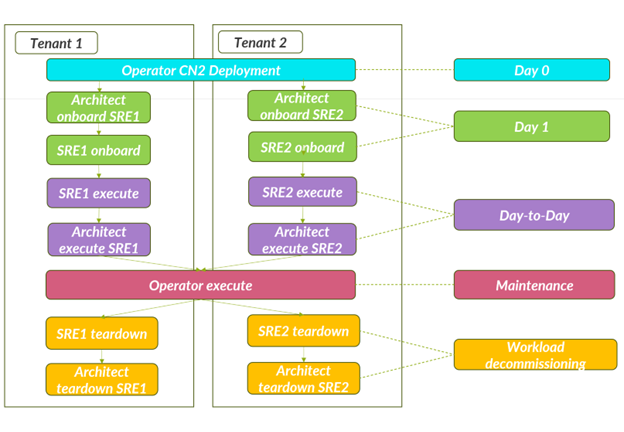
For test descriptions, see CN2 Pipelines Test Case Descriptions.
Profiles
Profile workflows are executed for a use case instance described in a profile YAML file. The profile YAML describes the parameters for namespaces, application layers, network policies, service type, and so on.
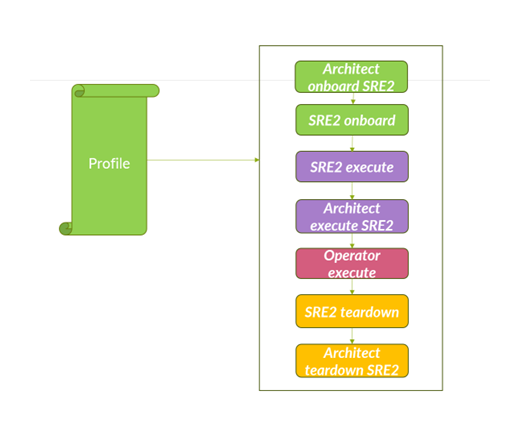
The profile file is mounted outside of a test container to give you flexibility with choice of scale parameters. For CN2 Pipelines, you can update the total number of pods only.
You can access the complete set of profiles from the downloaded CN2 Pipelines tar file in the folder: charts/workflow-objects/templates.
Example Profiles
The following sections have example profiles.
- Isolated LoadBalancer Profile
- Isolated NodePort Profile
- Multi-Namespace Contour Ingress LoadBalancer Profile
- Multi-Namespace Isolated LoadBalancer Profile
- Non-Isolated Nginx Ingress LoadBalancer Profile
Isolated LoadBalancer Profile
The IsolatedLoadBalancerProfile.yml configures a three-tier webservice profile as follows:
-
Frontend pods are deployed with a replica count of two (2). These frontend pods are accessed from outside of the cluster through the LoadBalancer service.
-
Middleware pods are deployed with a replica count of two (2) and an allowed address pair is configured on both the pods. These pods are accessible through the ClusterIP service from the frontend pods.
-
Backend pods are deployed with a replica count of two (2). Backend pods are accessible from middleware pods through the ClusterIP service.
-
Policies are created to allow traffic on configured ports on each tier.
IsolatedLoadbalancerProfile.yml
isl-lb-profile:
  WebService:
    isolated_namespace: True
    count: 1
    frontend:
      external_network: custom
      n_pods: 2
      services:
      - service_type: LoadBalancer
        ports:
          - service_port: 21
            target_port: 21
            protocol: TCP
    middleware:
      n_pods: 2
      aap: active-standby
      services:
      - service_type: ClusterIP
        ports:
          - service_port: 80
            target_port: 80
            protocol: TCP
    backend:
      n_pods: 2
      services:
      - service_type: ClusterIP
        ports:
          - service_port: 3306
            target_port: 3306
            protocol: UDP
Isolated NodePort Profile
The IsolatedNodePortProfile.yml configures a three-tier webservice profile as follows:
-
Frontend pods are deployed with a replica count of two (2). These frontend pods are accessed from outside of the cluster using haproxy node port ingress service.
-
Middleware pods are deployed with a replica count of two (2) and an allowed address pair is configured on both the pods. These pods are accessible through the ClusterIP service from the frontend pods.
-
Backend pods are deployed with a replica count of two (2). Backend pods are accessible from middleware pods through the ClusterIP service.
-
Policies are created to allow traffic on configured ports on each tier. Isolated namespace is enabled in this profile.
IsolatedNodePortProfile.yml
isl-np-web-profile-w-haproxy-ingress:
  WebService:
    count: 1
    isolated_namespace: True
    frontend:
      n_pods: 2
      anti_affinity: true
      liveness_probe: HTTP
      ingress: haproxy_nodeport
      services:
        - service_type: NodePort
          ports:
            - service_port: 443
              target_port: 443
              protocol: TCP
            - service_port: 80
              target_port: 80
              protocol: TCP
    middleware:
      n_pods: 2
      liveness_probe: command
      services:
        - service_type: ClusterIP
          ports:
            - service_port: 80
              target_port: 80
              protocol: TCP
    backend:
      n_pods: 2
      services:
        - service_type: ClusterIP
          ports:
            - service_port: 3306
              target_port: 3306
              protocol: UDP
Multi-Namespace Contour Ingress LoadBalancer Profile
The MultiNamespaceContourIngressLB.yml configures a three-tier webservice profile as follows:
-
Frontend pods are launched using deployment with a replica count of two (2). These frontend pods are accessed from outside of the cluster using haproxy node port ingress service.
-
Middleware pods are launched using deployment with a replica count of two (2) and an allowed address pair is configured on both the pods. These pods are accessible through the ClusterIP service from the frontend pods.
-
Backend pods are deployed with a replica count of two (2). Backend pods are accessible from middleware pods through the ClusterIP service.
-
Policies are created to allow traffic on configured ports on each tier. Isolated namespace is enabled in this profile.
MultiNamespaceContourIngressLB.yml
multi-ns-contour-ingress-profile:
  WebService:
    isolated_namespace: True
    multiple_namespace: True
    fabric_forwarding: True
    count: 1
    frontend:
      n_pods: 2
      ingress: contour_loadbalancer
      services:
      - service_type: ClusterIP
        ports:
          - service_port: 6443
            target_port: 6443
            protocol: TCP
    middleware:
      n_pods: 2
      services:
      - service_type: ClusterIP
        ports:
          - service_port: 80
            target_port: 80
            protocol: TCP
    backend:
      n_pods: 2
      services:
      - service_type: ClusterIP
        ports:
          - service_port: 3306
            target_port: 3306
            protocol: UDP
Multi-Namespace Isolated LoadBalancer Profile
The MultiNamespaceIsolatedLB.yml profile configures a three-tier webservice profile as follows:
-
Frontend pods are deployed with a replica count of two (2). These frontend pods are accessed from outside of the cluster using a LoadBalancer service.
-
Middleware pods are deployed with a replica count of two (2) and an allowed address pair is configured on both the pods. These middleware pods are accessible through the ClusterIP service from the frontend pods.
-
Backend pods are deployed with a replica count of two (2). Backend pods are accessible from middleware pods through the ClusterIP service.
-
Policies are created to allow traffic on configured ports on each tier. Isolated namespace is enabled in this profile in addition to multiple namespace for frontend, middleware, and backend deployments.
MultiNamespaceIsolatedLB.yml
multi-ns-lb-profile:
  WebService:
    isolated_namespace: True
    multiple_namespace: True
    count: 1
    frontend:
      n_pods: 2
      services:
      - service_type: LoadBalancer
        ports:
          - service_port: 443
            target_port: 443
            protocol: TCP
          - service_port: 6443
            target_port: 6443
            protocol: TCP
    middleware:
      n_pods: 2
      aap: active-standby
      services:
      - service_type: ClusterIP
        ports:
          - service_port: 80
            target_port: 80
            protocol: TCP
    backend:
      n_pods: 2
      services:
      - service_type: ClusterIP
        ports:
          - service_port: 3306
            target_port: 3306
            protocol: UDP
Non-Isolated Nginx Ingress LoadBalancer Profile
The NonIsolatedNginxIngressLB.yml profile configures a three-tier webservice profile as follows:
-
Frontend pods are deployed with a replica count of two (2). These frontend pods are accessed from outside of the cluster using a NGINX ingress LoadBalancer service.
-
Middleware pods are deployed with a replica count of two (2) and allowed address pair is configured on both the pods. These middleware pods are accessible through the ClusterIP service from the frontend pods.
-
Backend pods are deployed with a replica count of two (2). Backend pods are accessible from middleware pods through the ClusterIP service.
-
Policies are created to allow traffic on configured ports on each tier.
NonIsolatedNginxIngressLB .yml
non-isl-nginx-ingress-lb-profile:
  WebService:
    isolated_namespace: False
    count: 1
    frontend:
      ingress: nginx_loadbalancer
      n_pods: 2
      liveness_probe: HTTP
      services:
      - service_type: ClusterIP
        ports:
          - service_port: 80
            target_port: 80
            protocol: TCP
    middleware:
      n_pods: 2
      services:
      - service_type: ClusterIP
        ports:
          - service_port: 443
            target_port: 443
            protocol: TCP
    backend:
      n_pods: 2
      is_deployment: False
      liveness_probe: command
      services:
      - service_type: ClusterIP
        ports:
          - service_port: 3306
            target_port: 3306
            protocol: UDP
Test Environment Configuration
Starting in CN2 Release 23.2, the test environment requires that the pods in the Argo cluster have reachability to the network on which CN2 is deployed.
Configuration File
A test configuration file is a file in YAML format which describes a test execution environment.
Starting with CN2 Release 23.2:
-
the test configuration file is provided either as an input parameter for Argo Workflow or read from the ConfigMap.
-
The test environment is automatically configured when the ConfigMap is updated, deploying the test configuration file which contains parameters describing the test execution environment for Kubernetes or OpenShift.
-
CN2 cluster nodes are discovered automatically during test execution.
Kubeconfig File
The kubeconfig file data is used for authentication. The kubeconfig file is stored as a secret on the Argo host Kubernetes cluster.
Enter the following data in the kubeconfig file:
-
Server: Secret key must point to either the server IP address or host name.
-
For Kubernetes setups, point to the master node IP address: server:
https://xx.xx.xx.xx:6443
-
For OpenShift setups, point to the OpenShift Container Platform API server, extension, and server:
https://api.ocp.xxxx.com:6443
-
-
Client certificate: Kubernetes client certificate.
Test Execution with Micro-Profiles
A micro-profile is a logical subset of tests from a standard workflow profile. Tests are
executed using micro-profile kind markers.
How these markers work:
-
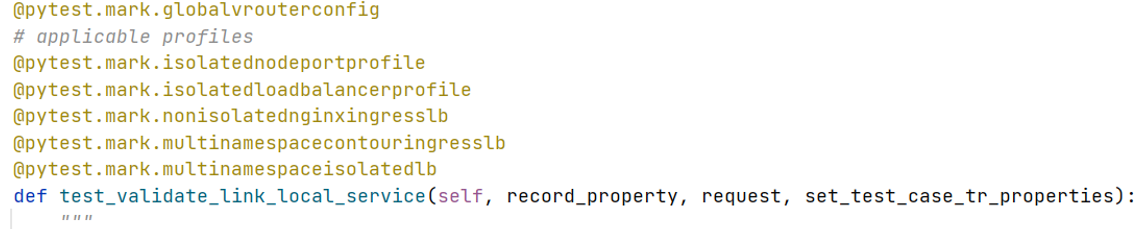
In pytest, for the SRE execute and Architect execute test suites, each test case has markers to indicate the applicable profile to use, as well as the Kubernetes and CN2 resource
kindmapping. -
The mapping profile
kindmarker is automatically chosen by thetrigger_pytest.py script. -
Only tests that match the marker
kindand profile requirements are executed. All applicable profiles are triggered in parallel by Argo Workflow.All profiles are triggered from Argo Workflow, then test(s) execution is decided for each of the steps in the profile.
-
If no tests for a
kindmarker are found in any profile, then all tests are executed.
Logging and Reporting
Two types of log files are created during each test run:
-
Pytest session log file—One per session
-
Test suite log file—One per test suite
Default file size is 50 MB. Log file rotation is supported.