Help us improve your experience.

Let us know what you think.

Do you have time for a two-minute survey?


Creating Domains for VLAN Flows

Use the Domain Management window to create domains based on JSA VLAN flow sources.

In JSA, you can assign domains to incoming flows based on the VLAN information that is contained in the flow. The incoming flows are mapped to domains that contain the same VLAN definition.

  1. On the navigation menu (I'm sorry, but I cannot generate alt text for the image from the URL provided without being able to view the image or having a description of it. Please provide a detailed description of the image or its context for assistance.), click Admin.
  2. In the System Configuration section, click Domain Management.
  3. Click Add and type a unique name and description for the domain.
    Tip:

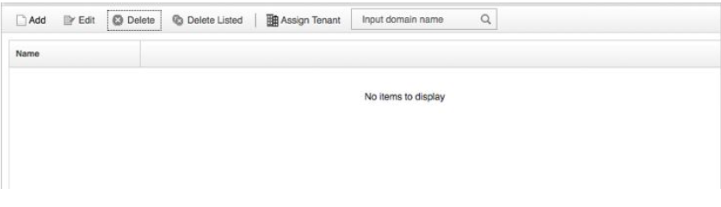
    You can check for unique names by typing the name in the Input domain name search box.

    Figure 1: Input Domain NameUser interface with buttons for Add, Edit, Delete, Delete Listed, Assign Tenant, and a search bar labeled Input domain name. Message: No items to display.
  4. Click the Flows tab, and then select Flow VLAN IDs.
  5. Select the enterprise VLAN ID and Customer VLAN ID values that match the values on the incoming flows, and then click Add.
    Note:
    • The Enterprise VLAN ID (IE): 82 is specified by Private Enterprise Number (PEN): 2, Information Element (IE) on incoming flows.

    • The Customer VLAN ID is specified by PEN: 2 and IE: 83 on incoming flows.

    Figure 2: New DomainUser interface for creating a new domain with fields for name and description. Flows tab selected with active Flow VLAN IDs sub-tab. Input fields for Enterprise and Customer VLAN IDs set to 0 with up/down arrows. Add button below, list shows No items to display. Bottom buttons: Remove Selected, Remove All, Create, Cancel.
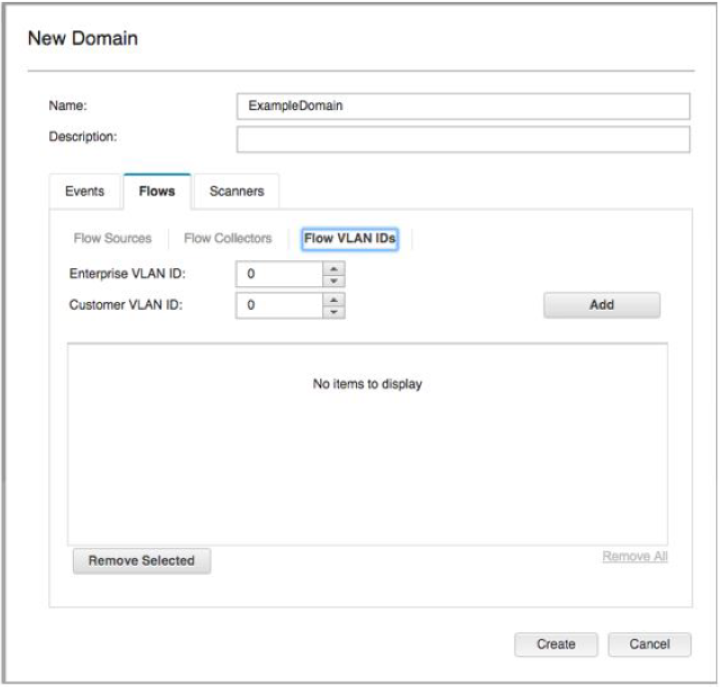
  6. In the Name field, type a unique name for the domain and then click Create.

    The domain definition is created and incoming flows are mapped. Tenant assignment to a domain occurs as normal.