
Add Routing Assurance to the Mist Portal
Follow these steps to link your Routing Assurance account to Juniper Mist™ and to enable the WAN Edges menu in the Juniper Mist portal.
Juniper Routing Assurance is a separate AIOps-based routing platform that you can link to from the Juniper Mist portal. Juniper Routing Assurance analyzes router performance, detects network anomalies, and provides visibility into forwarding and routing health. You can also identify peering issues with upstream devices, including those of cloud providers and partners.
To link services, you need a SuperUser account in Juniper Routing Assurance. In addition, if your Juniper Mist account is read-only, access to Routing Access will likewise be read-only, and the same is true for read-write access. There is a limit of one Routing assurance instance per Mist organization.
Juniper Mist uses an API token from Juniper Routing Assurance to establish the link. As such, from the Juniper Routing Assurance portal, you'll need to provide the Organization ID and create a API Token. Log in to the Routing Assurance portal and select Organization > Settings to create a Super User token and copy the Org ID.
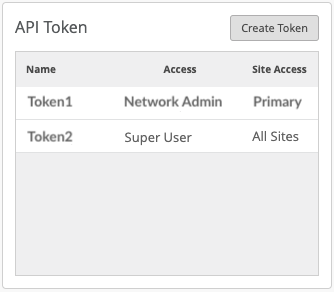
-
Scroll down to the Juniper Routing Assurance section and enter the following:
-
Organization ID─Use the organization ID from the Juniper Routing Assurance portal.
-
API Token Name─Use the name from Juniper Routing Assurance.
-
API Token─Use the API token you got from the Juniper Routing Assurance portal.

-
Once linked, Juniper Routing Assurance will be available in the Juniper Mist portal in the WAN Edges menu. Select Core Routers to open Routing Assurance in a new tab, and then sign in to the Juniper Routing Assurance portal.
If Routing Assurance doesn't open when selected in the Mist menu, check for a pop-up blocker.