
View Your Support Tickets
Follow these steps to go to your support dashboard and view the status of your tickets.
You can view your support tickets from the Juniper Mist™
portal.
-
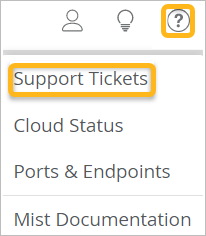
Click the question icon near the top-right corner of the Juniper Mist portal, and then
click Support Tickets.
-
(Optional) Select the time period.
