
Antenna Gains per AP Model
To choose the right Juniper access points (APs) for your needs, compare antenna gain values for various models.
Mist AP Antennas
The tables below show the maximum gain for which the Juniper Mist AP, or the AP plus an external antenna, is certified. Note, though, that the maximum allowable gain will vary according to the regulatory domain in which the AP is operating. As such, when configuring the gain settings for a given AP, you need to be sure not to exceed the maximum allowed by local regulations.
Take the case of an AP43E with an external directional antenna, for example. The AP supports a gain of up to 8 dBi on the 2.4 GHz radio band, and up to 10 dBi on the 5 GHz radio band. This level of gain will exceed the maximum allowed for some regulatory domains. Thus, although the AP hardware supports it, and you can configure a 10 dBi gain in the software, a setting of 10 dBi would be mistake if your local regulations do not allow it.
| Model | Antenna Type | 2.4 GHz | 5 GHz | 6 GHz |
|---|---|---|---|---|
| AP12 |
Omni |
2dBi | 5dBi |
~ |
| AP21 |
Omni |
3dBi | 5dBi |
~ |
| AP24 |
Omni |
3dBi | 5dBi |
5dBi |
| AP32 |
Omni |
5dBi | 6dBi |
~ |
| AP33 |
Omni |
5dBi | 6dBi |
~ |
| AP34 |
Omni |
4dBi | 6dBi |
6dBi |
| AP41 |
Omni |
4dBi | 5dBi | ~ |
| AP43 |
Omni |
4dBi | 6dBi |
~ |
| AP45 |
Omni |
3dBi | 5dBi |
5dBi |
| AP47 |
Omni |
4dBi | 6dBi | 6dBi |
| AP47D |
Directional |
6dBi | 8dBi | 8dBi |
| AP61 |
Omni |
4dBi | 5dBi |
~ |
| AP63 |
Omni |
4dBi | 6dBi |
~ |
| AP64 |
Omni |
3dBi | 5dBi |
5dBi |
| Model | Antenna Type | 2.4 GHz | 5 GHz | 6 GHz |
|---|---|---|---|---|
| AP47E |
Directional |
8dBi |
10dBi |
10dBi |
| AP45E |
Omni Directional |
4dBi 8dBi |
6dBi 10dBi |
6dBi 10dBi |
| AP43E |
Directional |
8dBi |
10dBi |
~ |
| AP41E |
Directional |
8dBi |
8dBi |
~ |
| AP63E |
Directional |
8dBi |
10dBi |
~ |
| AP61E |
Directional |
8dBi |
8dBi |
~ |
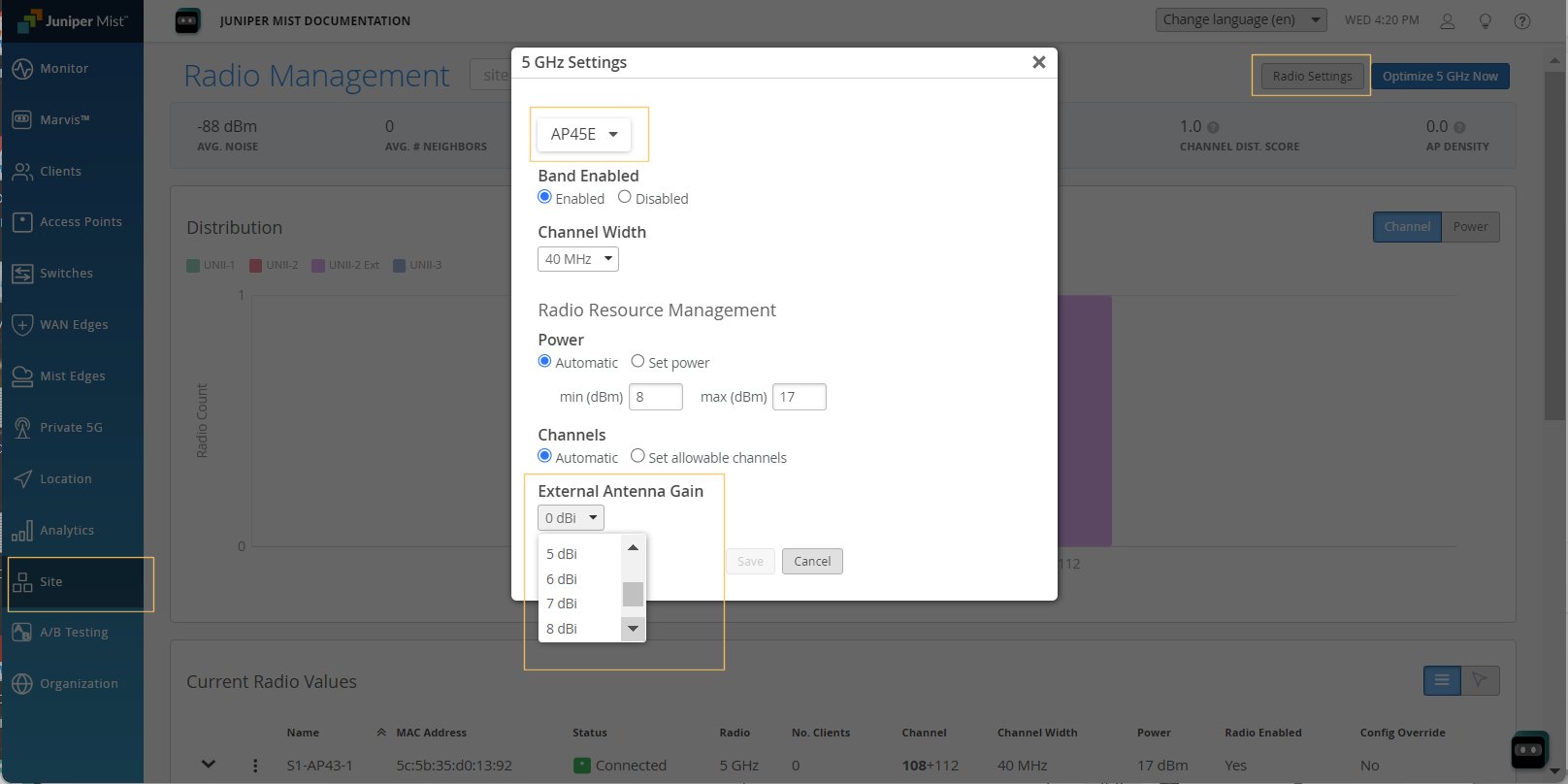
When configuring a gain of 6 dBi or higher for an external antenna, we recommend that you make the setting in the RF Template, a device profile, or at the level of the individual AP. An example configuration from the Radio Settings page (site-level) is shown in Figure 1. Note that the External Antenna Gain option does not appear for internal APs.