
Accessing Detailed Information for a Particular VPN
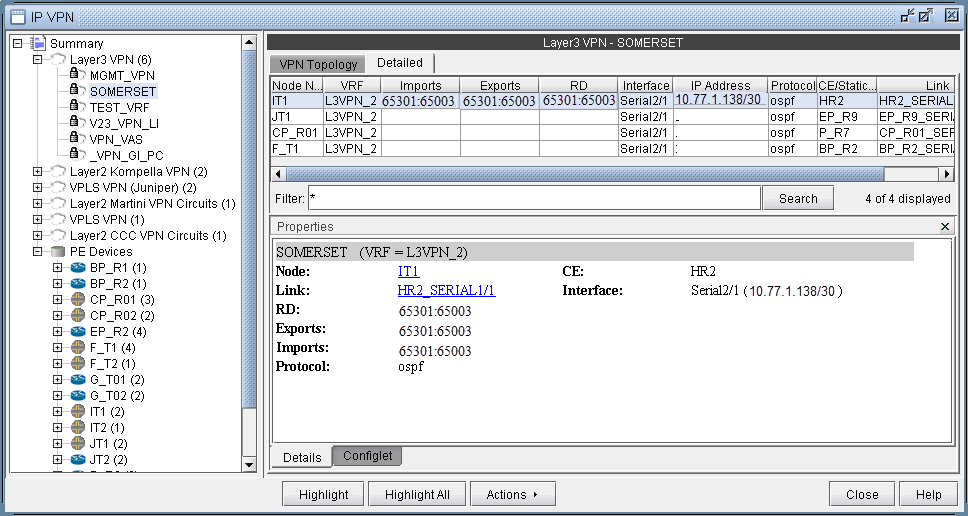
Accessing Detailed Information for a Particular VPNTo show the detailed information for a VPN, you may either double-click on a particular VPN in the IP VPN Summary window, or you may navigate through the VPN tree list on the left part of the window until the particular VPN is found. The following figure shows the detailed information for a VPN called SOMERSET. To see information for a particular node in the VPN, simply select the node from the table, and the Properties box will display the information. The figure shows the information for the router IT1. You can also click on Highlight All to have all the nodes in the VPN highlighted on the main topology map. If a particular node is selected, then you can click Highlight to only highlight that selected node.
Although the detailed information for each VPN type is different, the procedure for accessing the information remains the same. The following figure shows the detailed information for a L2K VPN.
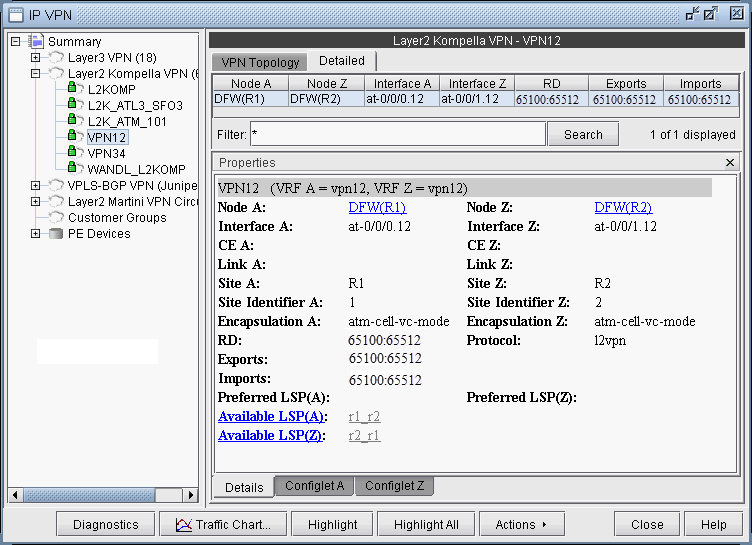
Note that for layer 2 circuits, there is a list of the assigned LSPs for each direction, if applicable. Otherwise, if no specific LSP has been assigned, a list of the available LSPs in each direction will be displayed.