Help us improve your experience.

Let us know what you think.

Do you have time for a two-minute survey?


Deleting or Renaming VPNs

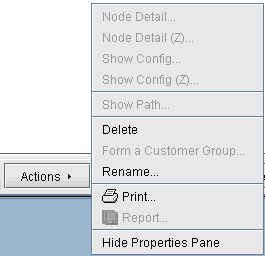
In case you want to rename a particular VPN, simply select a VPN, click on Actions, and choose Rename. Then specify a new name for the VPN when prompted.

In case you want to delete a particular VPN, simply select a VPN, click on Actions, and choose Delete.

Figure 1: VPN Rename and Delete ActionsDropdown menu with options: Node Detail grayed out, Node Detail Z grayed out, Show Config grayed out, Show Config Z grayed out, Show Path grayed out, Delete, Form a Customer Group, Rename, Print, Report, Hide Properties Pane.