
例:IS-IS ルートを優先するルーティングポリシーの設定
多数の IS-IS ルートを持つネットワークでは、ネットワーク トポロジーの変更に応じてルートを更新する順序を制御すると便利です。この例では、一部のIS-ISルートを他のルートよりも優先させるルーティングポリシーを定義する方法を示しています。IS-ISトポロジーが変更された場合、優先度の高いプレフィックスが最初にルーティングテーブルで更新され、次に優先度の中、次に優先度の低いプレフィックスが更新されます。インターネットサービスプロバイダ(ISP)は、この機能を使用して、重要な顧客のコンバージェンスを迅速化できます。
必要条件
この例を設定する前に、デバイスの初期化以外の特別な設定を行う必要はありません。
この例では、以下のハードウェアおよびソフトウェアコンポーネントを使用しています。
3 つのルーター
すべてのデバイスで実行されているJunos OS
概要
ルーティングテーブルにインストールされているIS-ISルートを優先または拒否できます。 reject ポリシーオプションを使用して、特定のプレフィックスからのルートまたは特定のタグでマークされたルートを拒否します。
IS-ISルートに優先順位を付けて、コンバージェンスを向上させ、差別化されたサービスを提供できます。いくつかのIGPプレフィックスの上にBGPレイヤー3 VPNまたはラベルベースのpsuedowireサービスが確立された、多数のIGPプレフィックスを持つネットワークでは、転送テーブルでルートが更新される順序を制御することが重要です。インポートポリシーを設定し、ルートタグを使用するか、プレフィックスに基づいてルートをフィルタリングしてから、ネットワーク要件に応じて優先度を high、 medium、または low に設定できます。IS-ISプロトコルは、設定された優先度に基づいて、rpdルーティングテーブルにルートをダウンロードします。インポートポリシーを設定しない場合、すべてのルートがデフォルトで中程度の優先度に設定されます。
IS-ISインポートポリシーを使用して、以下の基準に基づいて優先度を設定したり、IS-IS外部ルートをフィルタリングすることができます。
| Prefix |
|
| Route Tag |
|
IS-ISインポートポリシーが適用され、外部以外のルートに対して reject 終了アクションが生じた場合、 reject アクションは無視され、ルートは受け入れられます。デフォルトでは、このようなルートは、優先度が低でルーティングテーブルにインストールされます。この動作は、一貫したルーティングを確保することで、トラフィックのブラックホール、つまり静かに破棄されるトラフィックを防ぎます。ただし、 reject ポリシーオプションを使用して、プレフィックスまたは設定されたタグに基づいてルートを拒否することができます。
ルートダウンロードの順序変更として、マイクロループトラフィックが増加する場合があります。
位相幾何学
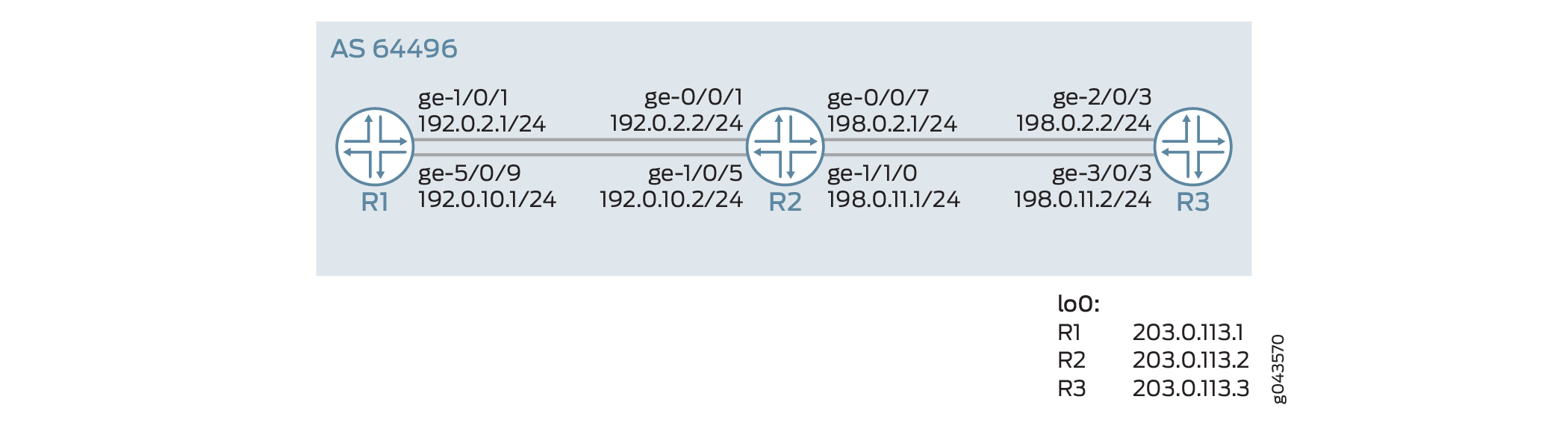
図1では、ルーターR1がルーターR2を介してルーターR3に接続されています。コンバージェンスを高速化するためには、ルーターR3へのルートに高い優先度を設定する必要があります。インポートルーティングポリシーはルーターR1に設定されており、ルーターR3に接続するルートに高い優先度を設定します。優先度が高であるため、203.0.113.3/32に一致するルートが最初にインストールされます。LDPは、IS-ISからルートとその設定優先度をインポートします。このルートは、ネットワーク トポロジーが変更された場合に最初に復元されます。
構成
CLIクイックコンフィグレーション
この例を迅速に設定するには、以下のコマンドをコピーしてテキストファイルに貼り付け、改行を削除し、ネットワーク設定に一致させる必要がある詳細情報を変更し、コマンドを [edit] 階層レベルでCLIにコピーアンドペーストして、設定モードからコミットを入力します。
ルーターR1
set interfaces ge-1/0/1 unit 0 description R1->R2
set interfaces ge-1/0/1 unit 0 family inet address 192.0.2.1/24
set interfaces ge-1/0/1 unit 0 family iso
set interfaces ge-1/0/1 unit 0 family inet6 address 2001:db8:1:2::1/64
set interfaces ge-1/0/1 unit 0 family mpls
set interfaces ge-5/0/9 unit 0 description R1->R2
set interfaces ge-5/0/9 unit 0 family inet address 192.0.10.1/24
set interfaces ge-5/0/9 unit 0 family iso
set interfaces ge-5/0/9 unit 0 family inet6 address 2001:db8:1:1::1/64
set interfaces ge-5/0/9 unit 0 family mpls
set interfaces lo0 unit 0 family inet address 203.0.113.1/32
set interfaces lo0 unit 0 family iso address 49.0002.0103.0000.0010.00
set interfaces lo0 unit 0 family inet6 address 2001:db8:1:1::1/128
set interfaces lo0 unit 0 family mpls
set protocols mpls ipv6-tunneling
set protocols mpls interface ge-5/0/9.0
set protocols mpls interface ge-1/0/1.0
set protocols isis level 1 disable
set protocols isis interface ge-1/0/1.0
set protocols isis interface ge-5/0/9.0
set protocols isis interface lo0.0 passive
set protocols ldp interface ge-1/0/1.0
set protocols ldp interface ge-5/0/9.0
set protocols ldp interface lo0.0
set policy-options policy-statement test_rf term t1 from route-filter 203.0.113.3/32 exact
set policy-options policy-statement test_rf term t1 then priority high
set protocols isis import test_rf
set routing-options router-id 203.0.113.1
set routing-options autonomous-system 64496
ルーターR2
set interfaces ge-0/0/1 unit 0 description R2->R1
set interfaces ge-0/0/1 unit 0 family inet address 192.0.2.2/24
set interfaces ge-0/0/1 unit 0 family iso
set interfaces ge-0/0/1 unit 0 family inet6 address 2001:db8:1:2::2/64
set interfaces ge-0/0/1 unit 0 family mpls
set interfaces ge-0/0/7 unit 0 description R2->R3
set interfaces ge-0/0/7 unit 0 family inet address 198.0.2.1/24
set interfaces ge-0/0/7 unit 0 family iso
set interfaces ge-0/0/7 unit 0 family inet6 address 2001:db8:1:2::1/64
set interfaces ge-0/0/7 unit 0 family mpls
set interfaces ge-1/0/5 unit 0 description R2->R1
set interfaces ge-1/0/5 unit 0 family inet address 192.0.10.2/24
set interfaces ge-1/0/5 unit 0 family iso
set interfaces ge-1/0/5 unit 0 family inet6 address 2001:db8:1:1::2/64
set interfaces ge-1/0/5 unit 0 family mpls
set interfaces ge-1/1/0 unit 0 family inet address 198.0.10.1/24
set interfaces ge-1/1/0 unit 0 family iso
set interfaces ge-1/1/0 unit 0 family inet6 address 2001:db8:::1::1/64
set interfaces ge-1/1/0 unit 0 family mpls
set interfaces lo0 unit 0 family inet address 203.0.113.2/32
set interfaces lo0 unit 0 family iso address 49.0002.0103.0000.0030.00
set interfaces lo0 unit 0 family inet6 address 2001:db8:2:2::1/128
set interfaces lo0 unit 0 family mpls
set protocols mpls interface ge-1/0/5.0
set protocols mpls interface ge-0/0/1.0
set protocols mpls interface ge-1/1/0.0
set protocols mpls interface ge-0/0/7.0
set protocols isis level 1 disable
set protocols isis interface ge-0/0/1.0
set protocols isis interface ge-0/0/7.0
set protocols isis interface ge-1/0/5.0
set protocols isis interface ge-1/1/0.0
set protocols isis interface lo0.0 passive
set protocols ldp interface ge-0/0/1.0
set protocols ldp interface ge-0/0/7.0
set protocols ldp interface ge-1/0/5.0
set protocols ldp interface ge-1/1/0.0
set protocols ldp interface lo0.0
set routing-options router-id 203.0.113.2
set routing-options autonomous-system 64496
ルーターR3
set interfaces ge-2/0/3 unit 0 description R3->R2
set interfaces ge-2/0/3 unit 0 family inet address 198.1.2.2/24
set interfaces ge-2/0/3 unit 0 family iso
set interfaces ge-2/0/3 unit 0 family inet6 address 2001:db8:1:2::2/64
set interfaces ge-2/0/3 unit 0 family mpls
set interfaces ge-3/0/10unit 0 description R3->R4
set interfaces ge-3/0/0 unit 0 family inet address 198.0.1.2/24
set interfaces ge-3/0/0 unit 0 family iso
set interfaces ge-3/0/0 unit 0 family inet6 address 2001:db8::1:1::2/64
set interfaces ge-3/0/0 unit 0 family mpls
set interfaces lo0 unit 0 family inet address 203.0.113.3/32
set interfaces lo0 unit 0 family iso address 49.0002.0103.0000.0020.00
set interfaces lo0 unit 0 family inet6 address 2001:db8:3:3::3/128
set interfaces lo0 unit 0 family mpls
set protocols mpls ipv6-tunneling
set protocols mpls interface ge-3/0/0.0
set protocols mpls interface ge-2/0/3.0
set protocols isis level 1 disable
set protocols isis interface ge-2/0/3.0
set protocols isis interface ge-3/0/0.0
set protocols isis interface lo0.0 passive
set protocols ldp interface ge-2/0/3.0
set protocols ldp interface ge-3/0/0.0
set protocols ldp interface lo0.0
set policy-options policy-statement add_tag term t1 from route-filter 203.0.113.3/32 exact
set policy-options policy-statement add_tag term t1 then tag 18
set protocols isis export add_tag
set routing-options router-id 203.0.113.3
set routing-options autonomous-system 64496
ルーターR1の設定
手順
次の例では、設定階層内のさまざまなレベルに移動する必要があります。CLIのナビゲーションについては、『CLIユーザーガイド』の「設定モードでのCLIエディターの使用」を参照してください。
ルーターR1を設定するには:
適切なインターフェイス名、アドレス、およびその他のパラメーターを変更した後、他のルーターに対してこの手順を繰り返します。
インターフェイスにIPv4およびIPv6アドレスを設定します。
[edit interfaces]
user@R1# set ge-1/0/1 unit 0 description R1->R2
user@R1# set ge-1/0/1 unit 0 family inet address 192.0.2.1/24
user@R1# set ge-1/0/1 unit 0 family iso
user@R1# set ge-1/0/1 unit 0 family inet6 address 2001:db8:1:2::1/64
user@R1# set ge-1/0/1 unit 0 family mpls
user@R1# set ge-1/0/1 unit 0 description R1->R2
user@R1# set ge-5/0/9 unit 0 family inet address 192.0.10.1/24
user@R1# set ge-5/0/9 unit 0 family iso
user@R1# set ge-5/0/9 unit 0 family inet6 address 2001:db8:1:1::1/64
user@R1# set ge-5/0/9 unit 0 family mpls
ループバックアドレスを設定します。
[edit interfaces]
user@R1# set lo0 unit 0 family inet address 203.0.113.1/32
user@R1# set lo0 unit 0 family iso address 49.0002.0103.0000.0010.00
user@R1# set lo0 unit 0 family inet6 address 2001:db8:1:1::1/128
user@R1# set lo0 unit 0 family mpls
MPLSを設定します。
[edit protocols]
user@R1# set mpls ipv6-tunneling
user@R1# set mpls interface ge-5/0/9.0
user@R1# set mpls interface ge-1/0/1.0
インターフェイスで IS-IS プロトコルを有効にします。
[edit protocols]
user@R1# set isis level 1 disable
user@R1# set isis interface ge-1/0/1.0
user@R1# set isis interface ge-5/0/9.0
user@R1# set isis interface lo0.0 passive
user@R1# set isis import test_rf
インターフェイスにLDPプロトコルを設定します。
[edit protocols]
user@R1# set ldp interface ge-1/0/1.0
user@R1# set ldp interface ge-5/0/9.0
user@R1# set ldp interface lo0.0
ルーターR3へのIS-ISルートを優先するポリシーを定義します。.
[edit policy-options]
user@R1# set policy-statement test_rf term t1 from route-filter 203.0.113.3/32 exact
user@R1# set policy-statement test_rf term t1 then priority high
ルーターIDと自律システム(AS)番号を設定します。
[edit routing--options]
user@R1# set routing-options router-id 203.0.113.1
user@R1# set routing-options autonomous-system 64496
業績
設定モードから、 show interfaces、 show protocols、 show policy-options 、および show routing-options コマンドを入力して設定を確認します。出力に意図した設定が表示されない場合は、この例の手順を繰り返して設定を修正します。
[edit]
user@R1> show interfaces
ge-1/0/1 {
    unit 0 {
        family inet {
            address 192.0.2.1/24;
        }
        family iso;
        family inet6 {
            address 2001:db8:1:2::1/64;
        }
        family mpls;
    }
}
ge-5/0/9 {
    unit 0 {
        family inet {
            address 192.0.2.1/24;
        }
        family iso;
        family inet6 {
            address 2001:db8:1:1::1/64;
        }
        family mpls;
    }
}
lo0 {
    unit 0 {
        family inet {
            address 203.0.113.1/32;
        }
        family iso {
            address 49.0002.0103.0000.0010.00;
        }
        family inet6 {
            address 2001:db8:1:1::1/128;
        }
        family mpls;
    }
}
[edit]
user@R1> show protocols
mpls {
    ipv6-tunneling;
    interface ge-5/0/9.0;
    interface ge-1/0/1.0;
}
isis {
    import test_rf;
    level 1 disable;
    interface ge-1/0/1.0;
    interface ge-5/0/9.0;
    interface lo0.0 {
        passive;
    }
}
ldp {
    interface ge-1/0/1.0;
    interface ge-5/0/9.0;
    interface lo0.0;
}
[edit]
user@R1> show routing-options
router-id 203.0.113.1;
autonomous-system 64496;
user@R1> sshow configuration policy-options
policy-statement test_rf {
    term t1 {
        from {
            route-filter 203.0.113.3/32 exact;
        }
        then priority high;
    }
}
検証
LDPルートの優先度の検証
目的
LDPがIS-ISプロトコルからルート203.0.113.3を継承していることを確認します。
アクション
運用モードから、ルーターR1で show route extensive コマンドを実行します。
user@R1> show route 203.0.113.3 extensive
inet.0: 26 destinations, 26 routes (26 active, 0 holddown, 0 hidden)

203.0.113.3/32 (1 entry, 1 announced)
        State: <FlashAll>
TSI:
KRT in-kernel 203.0.113.3/32 -> {16.1.2.2}
         *IS-IS  Preference: 18
                 Level: 2
                 Next hop type: Router, Next hop index: 0
                 Address: 0x4a1f43c
                 Next-hop reference count: 4
                 Next hop: 16.1.2.2 via ge-1/0/1.0, selected
                 Session Id: 0x0
                 Next hop: 16.1.1.2 via ge-5/0/9.0
                 Session Id: 0x0
                 State:  <Active Int HighPriority>
                 Local AS: 64496
                 Age: 59 	Metric: 20
                 Validation State: unverified
                 ORR Generation-ID: 0
                 	Tag: 18
                 Task: IS-IS
                 Announcement bits (2): 0-KRT 4-LDP
                 AS path: I

  inet.3: 2 destinations, 2 routes (2 active, 0 holddown, 0 hidden)

  203.0.113.3/32 (1 entry, 1 announced)
         State: <FlashAll>
         *LDP    Preference: 9
                 Next hop type: Router, Next hop index: 0
                 Address: 0x4a1e55c
                 Next-hop reference count: 2
                 Next hop: 16.1.2.2 via ge-1/0/1.0, selected
                 Label operation: Push 299776
                 Label TTL action: prop-ttl
                 Load balance label: Label 299776: None;
                 Label element ptr: 0x4b99100
                 Label parent element ptr: 0x0
                 Label element references: 2
                 Label element child references: 0
                 Label element lsp id: 0
                 Session Id: 0x0
                 Next hop: 16.1.1.2 via ge-5/0/9.0
                 Label operation: Push 299776
                 Label TTL action: prop-ttl
                 Load balance label: Label 299776: None;
                 Label element ptr: 0x4b99100
                 Label parent element ptr: 0x0
                 Label element references: 2
                 Label element child references: 0
                 Label element lsp id: 0
                 Session Id: 0x0
                 State:<Active Int HighPriority>
                 Local AS: 64496
                 Age: 59 	Metric: 1
                 Validation State: unverified
                 Task: LDP
                 Announcement bits (1): 2-Resolve tree 1
                 AS path: I
                 Secondary Tables: inet6.3
意味
出力では、LDPがルート203.0.113.3を継承し、優先順位がIS-ISから high していることを示しています。
IS-ISルートの優先度の検証
目的
IS-ISのルート203.0.113.3に優先度が設定されていることを確認します。
アクション
user@R1> show isis route download-priority
IS-IS routing table             Current version: L1: 0 L2: 122
IPv4/IPv6 Routes
----------------
Prefix             L Version   Metric Type Interface       NH   Via                 Backup Score
203.0.113.3/32         2     122       20 int  ge-1/0/1.0      IPV4 R2
                                           ge-5/0/9.0      IPV4 R2
203.0.113.2/32         2     122       10 int  ge-1/0/1.0      IPV4 R2
                                           ge-5/0/9.0      IPV4 R2
198.1.1.0/24        2     122       20 int  ge-1/0/1.0      IPV4 R2
                                           ge-5/0/9.0      IPV4 R2
198.1.2.0/24        2     122       20 int  ge-1/0/1.0      IPV4 R2
                                           ge-5/0/9.0      IPV4 R2
2001:db8:2:2::1/128  2     122       10 int  ge-1/0/1.0      IPV6 R2
                                           ge-5/0/9.0      IPV6 R2
2001:db8:3:3::3/128  2     122       20 int  ge-1/0/1.0      IPV6 R2
                                           ge-5/0/9.0      IPV6 R2
2001:db8:1:1::/64   2     122       20 int  ge-1/0/1.0      IPV6 R2
                                           ge-5/0/9.0      IPV6 R2
2001:db8:1:2::/64   2     122       20 int  ge-1/0/1.0      IPV6 R2
                                           ge-5/0/9.0      IPV6 R2
意味
ルートは、設定された優先度の順に表示されます。優先度 high 設定されたルート 203.0.113.3 が一番上に表示され、その後に優先度が中または低いルートが表示されます。