
APPENDIX: Debugging Examples Using the Junos OS CLI
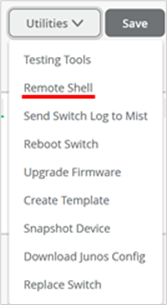
If you are familiar with the Junos OS CLI, you can utilize the commands shown below when checking something locally on a switch. The Juniper Mist portal can open a remote shell to each switch it manages as shown in Figure 1.
Figure 1: Switch Management
Utilities in the Juniper Mist Portal
Below is an example of a successful dynamic authentication using a MAB Auth-capable RADIUS server. You can see the dynamic filter attribute set the GBP tag to 300.
root@access1> show dot1x interface mge-0/0/3
802.1X Information:
Interface     Role           State           MAC address          User
mge-0/0/3.0   Authenticator  Authenticated   52:54:00:CB:93:DD    525400cb93dd

root@access1> show dot1x interface mge-0/0/3 detail
mge-0/0/3.0
  Role: Authenticator
  Administrative state: Auto
  Supplicant mode: Single
  Number of retries: 3
  Quiet period: 60 seconds
  Transmit period: 30 seconds
  Mac Radius: Enabled
  Mac Radius Restrict: Enabled
  Mac Radius Authentication Protocol: PAP
  Reauthentication: Enabled
  Reauthentication interval: 3600 seconds
  Supplicant timeout: 30 seconds
  Server timeout: 30 seconds
  Maximum EAPOL requests: 2
  Guest VLAN member: not configured
  Number of connected supplicants: 1
    Supplicant: 525400cb93dd, 52:54:00:CB:93:DD
      Operational state: Authenticated
      Backend Authentication state: Idle
      Authentication method: Mac Radius
      Authenticated VLAN: vlan1099
      Dynamic Filter: apply action gbp-tag 300
      Session Reauth interval: 3600 seconds
      Reauthentication due in 2595 seconds
      Session Accounting Interim  Interval: 36000 seconds
      Accounting Update  due in 34995 seconds
      Eapol-Block: Not In Effect
      Domain: Data
Next, review the MAC table of the local switch. For example:
- The dynamically learned MAC address
52:54:00:75:0a:f7is reported as being reachable by remote VTEP and having the GBP tag 300 assigned. - The dynamically learned MAC address
52:54:00:cb:93:ddis reported as being reachable locally on interface mge-0/0/3.0 with the GBP tag 300 assigned.root@access1> show ethernet-switching table MAC flags (S - static MAC, D - dynamic MAC, L - locally learned, P - Persistent static SE - statistics enabled, NM - non configured MAC, R - remote PE MAC, O - ovsdb MAC) Ethernet switching table : 4 entries, 4 learned Routing instance : default-switch Vlan MAC MAC GBP Logical SVLBNH/ Active name address flags tag interface VENH Index source vlan1033 5c:5b:35:be:82:be DR vtep.32771 172.16.254.5 vlan1033 d4:20:b0:01:46:09 D ge-0/0/16.0 vlan1099 52:54:00:75:0a:f7 DR 300 vtep.32771 172.16.254.5 vlan1099 52:54:00:cb:93:dd D 300 mge-0/0/3.0
Note:
The Junos OS CLI
show ethernet-switching
mac-ip-table
Below is an example of the Junos OS configuration for dynamically authenticated clients we used while testing:
set groups top firewall family any filter gbp_Limited-for-Cameras term 01 from gbp-src-tag 100
set groups top firewall family any filter gbp_Limited-for-Cameras term 01 from gbp-dst-tag 100
set groups top firewall family any filter gbp_Limited-for-Cameras term 01 then discard
set groups top firewall family any filter gbp_Limited-for-Cameras term 02 from gbp-src-tag 100
set groups top firewall family any filter gbp_Limited-for-Cameras term 02 from gbp-dst-tag 200
set groups top firewall family any filter gbp_Limited-for-Cameras term 02 then accept
set groups top firewall family any filter gbp_Limited-for-Cameras term 03 from gbp-src-tag 100
set groups top firewall family any filter gbp_Limited-for-Cameras term 03 from gbp-dst-tag 300
set groups top firewall family any filter gbp_Limited-for-Cameras term 03 then discard
set groups top firewall family any filter gbp_Full-for-IT term 01 from gbp-src-tag 200
set groups top firewall family any filter gbp_Full-for-IT term 01 from gbp-dst-tag 100
set groups top firewall family any filter gbp_Full-for-IT term 01 then accept
set groups top firewall family any filter gbp_Full-for-IT term 02 from gbp-src-tag 200
set groups top firewall family any filter gbp_Full-for-IT term 02 from gbp-dst-tag 200
set groups top firewall family any filter gbp_Full-for-IT term 02 then accept
set groups top firewall family any filter gbp_Full-for-IT term 03 from gbp-src-tag 200
set groups top firewall family any filter gbp_Full-for-IT term 03 from gbp-dst-tag 300
set groups top firewall family any filter gbp_Full-for-IT term 03 then accept
set groups top firewall family any filter gbp_Limited-Printers term 01 from gbp-src-tag 300
set groups top firewall family any filter gbp_Limited-Printers term 01 from gbp-dst-tag 100
set groups top firewall family any filter gbp_Limited-Printers term 01 then discard
set groups top firewall family any filter gbp_Limited-Printers term 02 from gbp-src-tag 300
set groups top firewall family any filter gbp_Limited-Printers term 02 from gbp-dst-tag 200
set groups top firewall family any filter gbp_Limited-Printers term 02 then accept
set groups top firewall family any filter gbp_Limited-Printers term 03 from gbp-src-tag 300
set groups top firewall family any filter gbp_Limited-Printers term 03 from gbp-dst-tag 300
set groups top firewall family any filter gbp_Limited-Printers term 03 then discard
set groups top forwarding-options evpn-vxlan gbp ingress-enforcement
set groups top forwarding-options evpn-vxlan gbp mac-ip-inter-tagging
set groups top chassis forwarding-options vxlan-gbp-profile