
例:AS PIC 手動 SA 設定
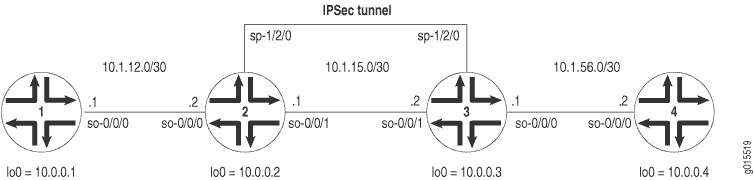
図 1 は、ES PIC マニュアル SA の例で使用されているものと同様の IPSec トポロジーを示しています。違いは、ルーター 2 とルーター 3 は AS PIC を使用して IPSec トンネルを確立し、わずかに変更された手動 SA 設定を使用する点です。ルーター 1 とルーター 4 はここでも基本的な接続を提供し、IPSec トンネルが動作していることを確認するために使用されます。
ルーター 1 で、ルーター 2 への基本的な OSPF 接続を提供します。
ルーター1
[edit]
interfaces {
    so-0/0/0 {
        description "To R2 so-0/0/0";
        unit 0 {
            family inet {
                address 10.1.12.2/30;
            }
        }
    }
    lo0 {
        unit 0 {
            family inet {
                address 10.0.0.1/32;
            }
        }
    }
}
routing-options {
    router-id 10.0.0.1;
}
protocols {
    ospf {
        area 0.0.0.0 {
            interface so-0/0/0.0;
            interface lo0.0;
        }
    }
}
ルーター2では、ルーター1および3に接続するための基盤となるルーティングプロトコルとしてOSPFを有効にします。 [edit ipsec-vpn rule] 階層レベルで、rule-manual-SA-BiEspshades と呼ばれるルールで双方向手動 SA を設定します。 [edit services service-set] 階層レベルの service-set-manual-BiEspshades というサービス セットでこのルールを参照します。
手動SAのすべての仕様を設定します。プロトコルには ESP、SPI には 261 、認証には HMAC-SHA1-96、暗号化には DES-CBC、SHA-1 認証鍵には 20 ビット ASCII 認証鍵、DES-CBC 認証鍵には 8 ビット ASCII 暗号鍵を使用します。(キーの長さの詳細については、「 認証と暗号化キーの長さ」を参照してください)。
AS PIC および IPSec トンネルにトラフィックを転送するには、ネクストホップ スタイルのサービス セットを設定し、IPSec 内部インターフェイスとして使用されるアダプティブ サービス論理インターフェイスを OSPF 設定に追加します。
ルーター2
[edit]
interfaces {
    so-0/0/0 {
        description "To R1 so-0/0/0";
        unit 0 {
            family inet {
                address 10.1.12.1/30;
            }
        }
    }
    so-0/0/1 {
        description "To R3 so-0/0/1";
        unit 0 {
            family inet {
                address 10.1.15.1/30;
            }
        }
    }
    sp-1/2/0 {
        services-options {
            syslog {
                host local {
                    services info;
                }
            }
        }
        unit 0 {
            family inet {
            }
                                 unit 1 { # sp-1/2/0.1 is the IPSec inside interface.
                family inet;
                service-domain inside;
            }
                                 unit 2 { # sp-1/2/0.2 is the IPSec outside interface.
                family inet;
                service-domain outside;
            }
        }
        lo0 {
            unit 0 {
                family inet {
                    address 10.0.0.2/32;
                }
            }
        }
    }
    routing-options {
        router-id 10.0.0.2;
    }
    protocols {
        ospf {
            area 0.0.0.0 {
                interface so-0/0/0.0;
                interface lo0.0;
                                     interface sp-1/2/0.1; # This sends OSPF traffic over the IPSec tunnel.
            }
        }
    }
    services {
                           service-set service-set-manual-BiEspshades { # Define your service set here.
                                 next-hop-service { # Required for dynamic routing protocols such as OSPF.
                inside-service-interface sp-1/2/0.1;
                outside-service-interface sp-1/2/0.2;
            }
            ipsec-vpn-options {
                                     local-gateway 10.1.15.1; # Specify the local IP address of the IPSec tunnel.
            }
                               ipsec-vpn-rules rule-manual-SA-BiEspshades; # Reference the IPSec rule here.
        }
        ipsec-vpn {
                                 rule rule-manual-SA-BiEspshades { # Define your IPSec VPN rule here.
                term term-manual-SA-BiEspshades {
                    then {
                                                 remote-gateway 10.1.15.2; # The remote IP address of the IPSec tunnel.
                                                   manual { # Define the manual SA specifications here.
                                                         direction bidirectional {
                                protocol esp;
                                spi 261;
                                authentication {
                                    algorithm hmac-sha1-96;
                                    key ascii-text "$ABC123";
                                    ## The unencrypted key is juniperjuniperjunipe (20 characters for HMAC-SHA-1-96).
                                }
                                                               encryption {
                                    algorithm des-cbc;
                                    key ascii-text "$ABC123";
                                    ## The unencrypted key is juniperj (8 characters for DES-CBC).
                                }
                            }
                        }
                    }
                }
                                     match-direction input; # Correct match direction for next-hop service sets.
            }
        }
    }
    }
security {
    pki {
        auto-re-enrollment {
            certificate-id certificate-name {
                ca-profile ca-profile-name;
                challenge-password password;
                re-enroll-trigger-time-percentage percentage; #Percentage of validity-period
# (specified in certificate) when automatic
# reenrollment should be initiated.
                re-generate-keypair;
                validity-period number-of-days;
            }
        }
    }
ルーター3では、ルーター2および4に接続するための基盤となるルーティングプロトコルとしてOSPFを有効にします。 [edit ipsec-vpn rule] 階層レベルで、rule-manual-SA-BiEspshades と呼ばれるルールで双方向手動 SA を設定します。 [edit services service-set] 階層レベルの service-set-manual-BiEspshades というサービス セットでこのルールを参照します。
ルーター2で指定したのと同じ仕様を手動SAに設定します。プロトコルには ESP、SPI には 261 、認証には HMAC-SHA1-96、暗号化には DES-CBC、SHA-1 認証鍵には 20 ビット ASCII 認証鍵、DES-CBC 認証鍵には 8 ビット ASCII 暗号鍵を使用します。(キーの長さの詳細については、「 認証と暗号化キーの長さ」を参照してください)。
AS PIC および IPSec トンネルにトラフィックを転送するには、ネクストホップ スタイルのサービス セットを設定し、IPSec 内部インターフェイスとして使用されるアダプティブ サービス論理インターフェイスを OSPF 設定に追加します。
ルーター3
[edit]
interfaces {
    so-0/0/0 {
        description "To R4 so-0/0/0";
        unit 0 {
            family inet {
                address 10.1.56.1/30;
            }
        }
    }
    so-0/0/1 {
        description "To R2 so-0/0/1";
        unit 0 {
            family inet {
                address 10.1.15.2/30;
            }
        }
    }
    sp-1/2/0 {
        services-options {
            syslog {
                host local {
                    services info;
                }
            }
        }
        unit 0 {
            family inet {
            }
                                 unit 1 { # sp-1/2/0.1 is the IPSec inside interface.
                family inet;
                service-domain inside;
            }
                                 unit 2 { # sp-1/2/0.2 is the IPSec outside interface.
                family inet;
                service-domain outside;
            }
        }
        lo0 {
            unit 0 {
                family inet {
                    address 10.0.0.3/32;
                }
            }
        }
    }
    routing-options {
        router-id 10.0.0.3;
    }
    protocols {
        ospf {
            area 0.0.0.0 {
                interface so-0/0/0.0;
                interface lo0.0;
                                     interface sp-1/2/0.1; # This sends OSPF traffic over the IPSec tunnel.
            }
        }
    }
    services {
                           service-set service-set-manual-BiEspshades { # Define your service set here.
                                 next-hop-service { # Required for dynamic routing protocols such as OSPF.
                inside-service-interface sp-1/2/0.1;
                outside-service-interface sp-1/2/0.2;
            }
            ipsec-vpn-options {
                                     local-gateway 10.1.15.2; # Specify the local IP address of the IPSec tunnel.
            }
                               ipsec-vpn-rules rule-manual-SA-BiEspshades; # Reference the IPSec rule here.
        }
        ipsec-vpn {
                                 rule rule-manual-SA-BiEspshades { # Define your IPSec VPN rule here.
                term term-manual-SA-BiEspshades {
                    then {
                                                 remote-gateway 10.1.15.1; # The remote IP address of the IPSec tunnel.
                                                   manual { # Define the manual SA specifications here.
                                                         direction bidirectional {
                                protocol esp;
                                spi 261;
                                authentication {
                                    algorithm hmac-sha1-96;
                                    key ascii-text "$ABC123";
                                    ## The unencrypted key is juniperjuniperjunipe (20 characters for HMAC-SHA-1-96).
                                }
                                                               encryption {
                                    algorithm des-cbc;
                                    key ascii-text "$ABC123";
                                    ## The unencrypted key is juniperj (8 characters for DES-CBC).
                                }
                            }
                        }
                    }
                }
                                     match-direction input; # Specify in which direction the rule should match.
            }
        }
    }
}
ルーター 4 で、ルーター 3 への基本的な OSPF 接続を提供します。
ルーター4
[edit]
interfaces {
    so-0/0/0 {
        description "To R3 so-0/0/0";
        unit 0 {
            family inet {
                address 10.1.56.2/30;
            }
        }
    }
    lo0 {
        unit 0 {
            family inet {
                address 10.0.0.4/32;
            }
        }
    }
}
routing-options {
        router-id 10.0.0.4;
}
protocols {
    ospf {
        area 0.0.0.0 {
            interface so-0/0/0.0;
            interface lo0.0;
        }
    }
}
機能の検証
AS PIC で手動 IPSec SA が正しく動作していることを確認するには、次のコマンドを使用します。
-
ピン
-
show services ipsec-vpn ipsec security-associations(詳細) -
show services ipsec-vpn ipsec statistics
以下のセクションでは、設定例で使用されるこれらのコマンドの出力を示します。
ルーター1
ルーター 1 で、ルーター 4 の lo0 インターフェイスに ping コマンドを発行し、IPsec トンネルを介してトラフィックを送信します。
user@R1> ping 10.0.0.4
PING 10.0.0.4 (10.0.0.4): 56 data bytes
64 bytes from 10.0.0.4: icmp_seq=0 ttl=254 time=1.375 ms
64 bytes from 10.0.0.4: icmp_seq=1 ttl=254 time=18.375 ms
64 bytes from 10.0.0.4: icmp_seq=2 ttl=254 time=1.120 ms
^C
--- 10.0.0.4 ping statistics ---
3 packets transmitted, 3 packets received, 0% packet loss
round-trip min/avg/max/stddev = 1.120/6.957/18.375/8.075 ms
ルーター2
IPSec セキュリティ アソシエーションがアクティブであることを確認するには、 show services ipsec-vpn ipsec security-associations detail コマンドを発行します。SA には、プロトコルの ESP や認証アルゴリズムの HMAC-SHA1-96 など、指定した設定が含まれていることに注意してください。
user@R2> show services ipsec-vpn ipsec security-associations detail
Service set: service-set-manual-BiEspshades
  Rule: rule-manual-SA-BiEspshades, Term: term-manual-SA-BiEspshades,
  Tunnel index: 1
  Local gateway: 10.1.15.1, Remote gateway: 10.1.15.2
  Local identity: ipv4_subnet(any:0,[0..7]=10.0.0.0/8)
  Remote identity: ipv4_subnet(any:0,[0..7]=0.0.0.0/0)

    Direction: inbound, SPI: 261, AUX-SPI: 0
    Mode: tunnel, Type: manual, State: Installed
    Protocol: ESP, Authentication: hmac-sha1-96, Encryption: des-cbc
    Anti-replay service: Disabled

    Direction: outbound, SPI: 261, AUX-SPI: 0
    Mode: tunnel, Type: manual, State: Installed
    Protocol: ESP, Authentication: hmac-sha1-96, Encryption: des-cbc
    Anti-replay service: Disabled
トラフィックが双方向IPsecトンネル上を移動していることを確認するには、 show services ipsec-vpn statistics コマンドを発行します。
user@R2> show services ipsec-vpn ipsec statistics

PIC: sp-1/2/0, Service set: service-set-manual-BiEspshades

ESP Statistics:
  Encrypted bytes:             1616
  Decrypted bytes:             1560
  Encrypted packets:             20
  Decrypted packets:             19
AH Statistics:
  Input bytes:                    0
  Output bytes:                   0
  Input packets:                  0
  Output packets:                 0
Errors:
  AH authentication failures: 0, Replay errors: 0
  ESP authentication failures: 0, ESP decryption failures: 0
  Bad headers: 0, Bad trailers: 0
ルーター3
IPsecセキュリティアソシエーションがアクティブであることを確認するには、 show services ipsec-vpn ipsec security-associations detail コマンドを発行します。正常に実行するには、ルーター 3 の SA に、ルーター 2 で指定したのと同じ設定が含まれている必要があります。
user@R3> show services ipsec-vpn ipsec security-associations detail
Service set: service-set-manual-BiEspshades
  Rule: rule-manual-SA-BiEspshades, Term: term-manual-SA-BiEspshades,
  Tunnel index: 1
  Local gateway: 10.1.15.2, Remote gateway: 10.1.15.1
  Local identity: ipv4_subnet(any:0,[0..7]=10.0.0.0/8)
  Remote identity: ipv4_subnet(any:0,[0..7]=0.0.0.0/0)

    Direction: inbound, SPI: 261, AUX-SPI: 0
    Mode: tunnel, Type: manual, State: Installed
    Protocol: ESP, Authentication: hmac-sha1-96, Encryption: des-cbc
    Anti-replay service: Disabled

    Direction: outbound, SPI: 261, AUX-SPI: 0
    Mode: tunnel, Type: manual, State: Installed
    Protocol: ESP, Authentication: hmac-sha1-96, Encryption: des-cbc
    Anti-replay service: Disabled
トラフィックが双方向IPsecトンネル上を移動していることを確認するには、 show services ipsec-vpn statistics コマンドを発行します。
user@R3> show services ipsec-vpn ipsec statistics
PIC: sp-1/2/0, Service set: service-set-manual-BiEspshades
ESP Statistics:
  Encrypted bytes:             1560
  Decrypted bytes:             1616
  Encrypted packets:             19
  Decrypted packets:             20
AH Statistics:
  Input bytes:                    0
  Output bytes:                   0
  Input packets:                  0
  Output packets:                 0
Errors:
  AH authentication failures: 0, Replay errors: 0
  ESP authentication failures: 0, ESP decryption failures: 0
  Bad headers: 0, Bad trailers: 0